OtakuSolutions
3dsMax
🔗 Fast Ref Early Access
🏃 BipedPlus Beta
Maya
Solution - Next (Coming Soon)
User Guides
📖 Common Guide 🔗 Fast Ref 🏃 BipedPlus
💡 Rigging Guideline
🔌 API Reference ←
Company
The First Settlers
Work Guarantee
📋 Updates 📢 Announcements
📧 Contact 📝 Feedback
🇰🇷 한국어 🇺🇸 English 🇯🇵 日本語 🇨🇳 中文
Products
🔗 Fast Ref 🏃 BipedPlus
Learn
📖 Common Guide 🔗 Fast Ref 🏃 BipedPlus 🔌 API Reference ←
Language
🇰🇷 한국어 🇺🇸 EN 🇯🇵 JP 🇨🇳 ZH

📚 Guide

All Guides
📖 Common 5
🔗 Fast Ref 17
Getting Started
Quick Start Guide Language Settings (Multi-language) File Check
Basic Features
Add / Remove Replace / Reload Merge / Convert Activate Space Unpack Feature
Advanced Features
FBX Options Settings FBX Export Modes FBX Export Tips by Engine Rigging Info Part 1 | Rig Structure & FBX Export
FAQ
[FAQ] Constraints Are Not Restoring Properly [FAQ] Animation Data Is Disappearing [FAQ] How Do I Use Our Studio's Custom Export Tool? [FAQ] "Not an Autodesk path" Installation Error Resolution Guide [FAQ] SmartAnim External Plugin Integration Guide
🔗 Fast Ref Batch 6
🏃 BipedPlus 2
SkinLayerStudio 1
💡 Rigging Guideline 3
  1. Home
  2. /
  3. Guide
  4. /
  5. Fast Ref
  6. /
  7. Language Settings (Multi-language)
Fast Ref / Getting Started

Language Settings (Multi-language)
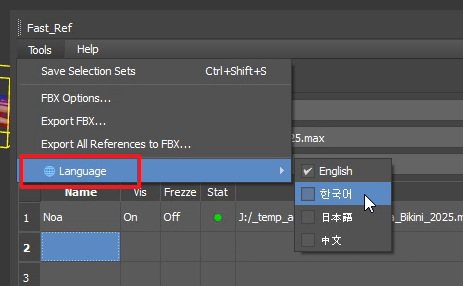

Fast-Ref supports multiple languages.

You can change the language as shown in the image above. Restart the tool and it will switch to your selected language.


Previous
Quick Start Guide
Next
File Check

Need more help?

Contact Support
×

OtakuSolutions

Professional DCC tool development for 3dsMax, Maya, Blender artists.

Products

  • Fast Ref
  • Biped Plus

Resources

  • User Guides
  • API Reference
  • Support

© 2025 OtakuSolutions. All rights reserved.