Fast Ref
FAQ.1 — Constraint restore is not working properly
Download Markdown Download with Images1. Scenario
- Symptom: During animation work, Link Constraint set up with Fast-Ref disappears after Reload, or data is not restored correctly.
- User experience: Because restore fails, you must redo work manually using Point Constraint and similar tools.
2. Fast-Ref constraint restore algorithm (Logic)
For data integrity on reload, Fast-Ref decides whether to restore constraints using the comparison algorithm below.
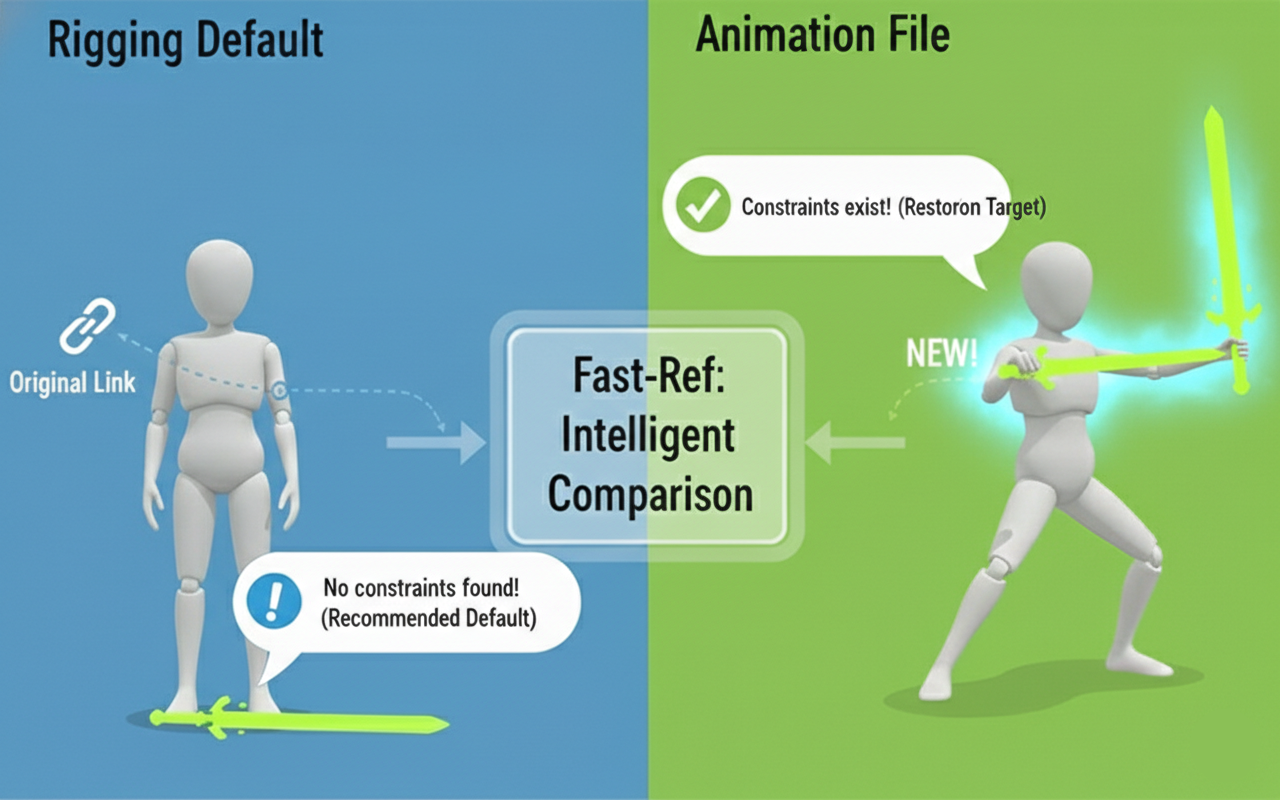
| Category | [Skip] Default rig state | [Restore] Fast-Ref custom work |
|---|---|---|
| Decision criteria | Rig and Ani files already have the same Link | Constraint exists in Ani but not in Rig |
| Algorithm behavior | Treated as “same as source”, “rig source takes priority” and ignored | Treated as “user data”, recorded separately and restored |
| Design intent | Skip unnecessary constraint processing for optimization | Ensure animation and added constraints are reflected in Ani automatically |
[Skip] Same as rig source
- Rig file: Already has constraints (Point, Orient, Link, etc.), and
- Ani file: Also has constraints (Point, Orient, Link, etc.)
→ Treated as the rig’s default state and excluded from the restore list (so rig edits flow through naturally).
[Restore] New changes created with Fast-Ref
Constraints added by the artist via Fast-Ref that are not in the rig file are recognized as user animation data, stored on a separate layer, and referenced for restore on Replace / Reload.
3. Root cause
The issue you encountered is an edge case in the algorithm’s decision logic.
- Misidentified data: Because constraints already existed on both the rig and ani files when you worked, the tool assumed they were not newly created by the user but already on the rig, and skipped (Skip) them from restore.
4. Solution
To fully reflect user intent, follow these approaches:
Option A: Clean up the rig file (recommended)
Keep the rig file clean so the algorithm does not confuse source vs. work files.
- Description: Do not pre-apply Link Constraint on props/weapons in the rig source.
- Reason: If links already exist on the source, Fast-Ref may treat links you set in the animation file as “always there” and Skip them from restore.
- Recommendation: Leave weapons clean on the floor and let animators apply links in the animation scene via Fast-Ref for reliable 100% restore.
Option B: Custom Attr or driven connections
A more advanced rig approach that avoids the constraint-restore path entirely.
- Description: Instead of restoring constraints, control links via custom Attr (e.g. Switch 0/1) or drives (e.g. position X) on controllers.
- Reason: This does not create new constraints in the animation scene, so nothing needs restoring and data loss risk is eliminated.
- Note: Common in major studio rigs (e.g. Maya), but requires a dedicated Rigging TD on the team.