Ep.4 — Unpack (Deconstructing the Package Structure for Tool Compatibility)
Download Markdown Download with ImagesSummary: Fast-Ref wraps reference data in a virtual safety package for scene stability. If in-house legacy scripts or external plugins cannot recognise this, simply enable Unpack to temporarily expose the raw scene structure.
1. Understanding Fast-Ref's Internal Packaging Mechanism
To prevent reference data inside the scene from being corrupted or lost during 3ds Max's own Garbage Collection process, Fast-Ref specially packages data (stores it inside a virtual fence) and manages it.
The vast majority of ordinary animation work, viewport navigation, and keyframing operates perfectly in the default state without touching Unpack at all.
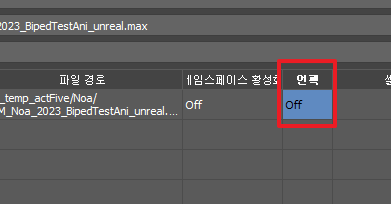
2. When and Why Is Unpack Needed?
Production environments contain a mix of numerous in-house plugins, specific framework scripts, or specialised legacy exporters. These tools are often hardcoded to only directly read "standard 3ds Max scene graph nodes."
This can cause compatibility issues where external tools error out or characters cannot be selected because they cannot read Fast-Ref's special packaging fence. This is when you use the Unpack On switch.
- When Unpack is enabled: Nodes that were hidden and wrapped inside Fast-Ref's safety fence are fully deconstructed and exposed at the scene level as pure 3ds Max nodes matching the original file.
- Management still maintained: Remarkably, even though the nodes are exposed like ordinary objects, Fast-Ref's table still perfectly tracks and maintains the ownership link — "which file this is connected to and whose Namespace it belongs to."
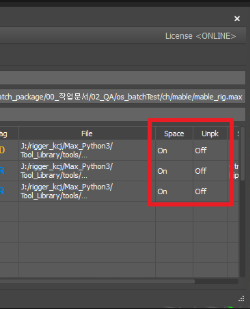
3. The Relationship Between Namespace and Unpack Options
Depending on studio pipeline constraints, artists must appropriately navigate among these three key configuration axes:
- Namespace On: Must always be on when placing multiple characters — this is the safe default.
- Namespace Off: Turn this off only when another in-house tool cannot interpret the colon prefix (
:) at all. (In this case all node names are unified, so caution is needed when replacing multi-character setups.) - Unpack On: Peels off the virtual package structure, opening the door wide so legacy tools can freely analyse bones and controllers.
💡 Practical Guidelines Summary
- For everyday work or a pure Fast-Ref-based pipeline, Unpack Off is the most stable state — leave it as is.
- Only enable Unpack On to build a compatibility bridge when a company-specific "inspection tool" or "export engine plugin" screams that it cannot find nodes.