Ep.7 — Game Engine FBX Export (Pipeline Overview for Beginners)
Download Markdown Download with ImagesSummary: Fast-Ref is not just an internal 3ds Max scene reference tool — it also contains a powerful dedicated FBX exporter that can push finished animation data to Unreal or Unity in one shot.
1. Building a Single Pipeline from Scene Management to Engine Deployment
Many development teams use separate hand-built tools for the animation keying environment and for extracting files to import into a game engine (Unreal, Unity, etc.).
However, when those hand-built tools operate independently, version management gets tangled and bone axis or Namespace rule conflicts frequently cause animation distortion accidents inside the engine.
Fast-Ref is designed to integrate everything under a single UI flow (All-in-One) — from animation production all the way to final distribution of files optimised for game engine import specifications.
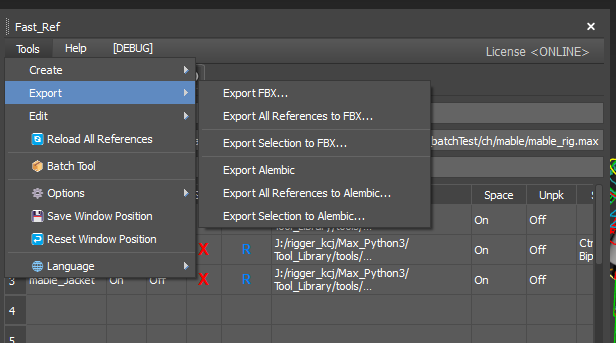
2. FBX Export Entry Point and Core Features
Opening the Tools menu at the top of the Fast-Ref main window gives immediate access to the export sequence.
- One-click single / batch export: Instantly export just a single character from the scene, or simultaneously output 3–4 characters in a scene as separate individual FBX files in one go.
- Unified FBX options system: The single exporter in the main window and the Batch Tool (EP09) that batch-processes dozens of max files share the exact same global FBX settings, completely preventing the catastrophe of artists and batch processes outputting differently and introducing bugs.
3. Thoroughly Validated in Real Engine Production (Unreal & Unity)
During Fast-Ref's development, OtakuSolutions did not rely on hypothetical scenarios — they closely collaborated with TA, rigger, and cinematic animator teams on actual large-scale game production floors, rigorously pre-validating export results under real Unreal Engine and Unity build environments.
- Prevention of bone axis twist artefacts
- Namespace removal compatibility
- Elimination of bone scaling deformation errors
This pre-refined FBX exporter is ready to be plugged directly into engine build pipelines — set the detailed options once and trust it to deliver production-ready results every time.
🎯 Roadmap to Mastering Exports
- Now (EP07): Grasping the concept — "Ah, Fast-Ref handles engine-compatible FBX perfectly from within the same tool!"
- Next (EP08): Opening the FBX options panel to dissect why you need to turn off Skin when exporting animation clips only, and why Smooth Groups matter
- Finally (EP09): Learning the Batch Tool to automatically export 20+ scenes overnight using those options