Common
[FAQ] 「Not an Autodesk path」インストールエラー解決ガイド
Markdownダウンロード 画像込みダウンロード注意:
os_fast_ref_packageフォルダ自体をそのままコピーしてください。フォルダ内のファイルだけをコピーしても動作しません。
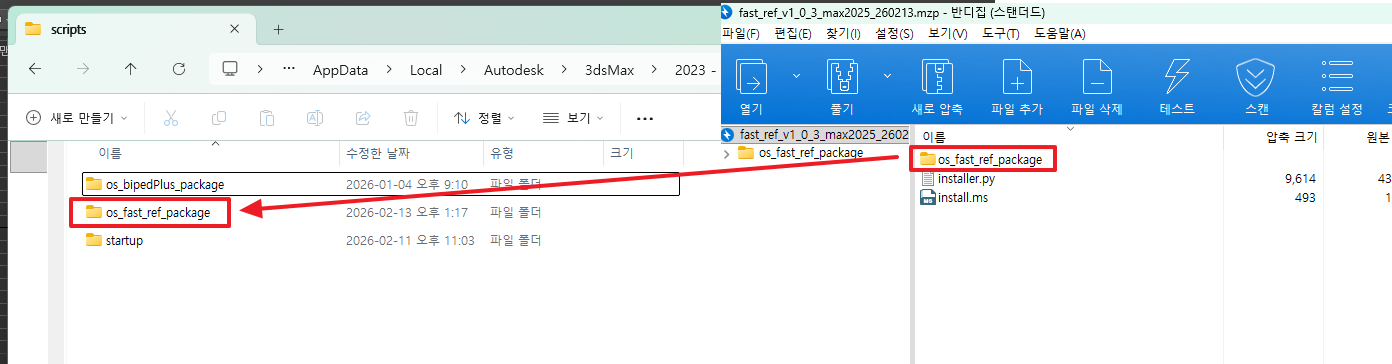
Step 4. マクロとメニューの登録
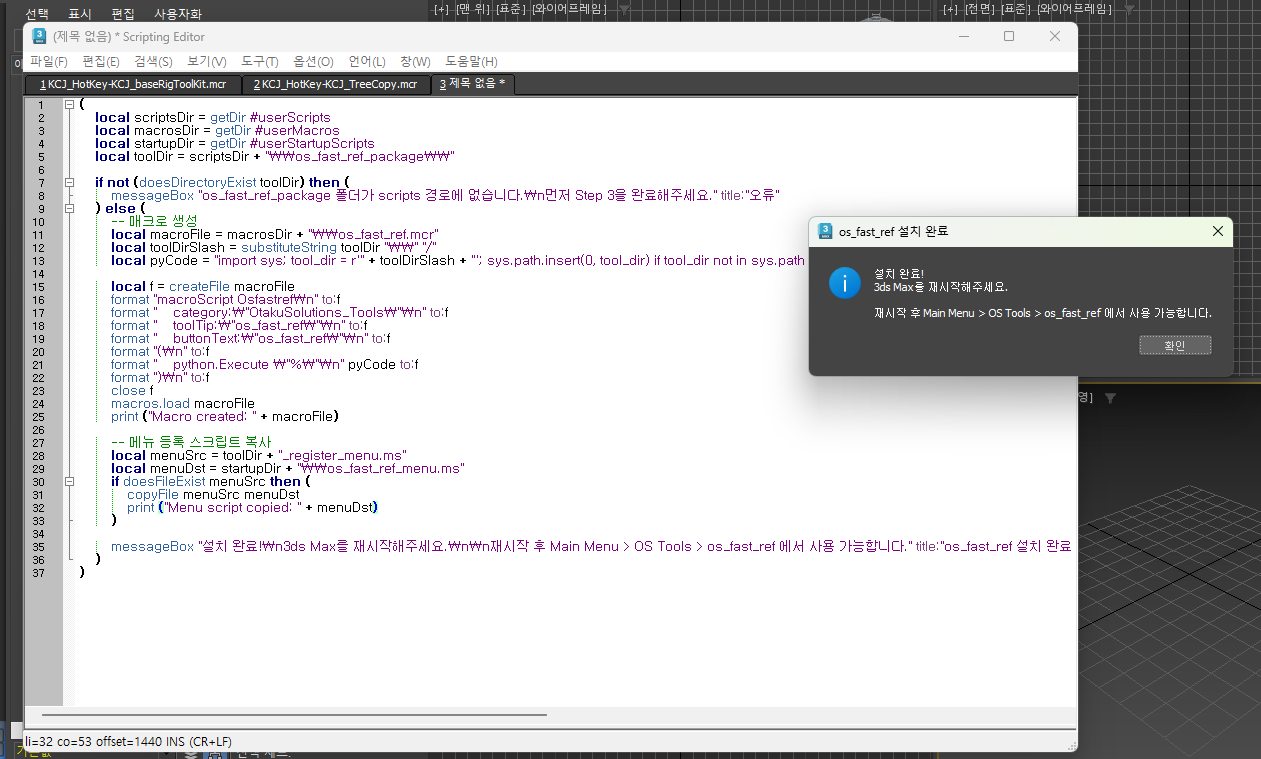
3ds Max の MAXScript Listener(F11 キー)に以下のスクリプトを 全選択 → コピー → 貼り付け して Enter を押して実行します。
このスクリプトは 3ds Max のバージョンを自動で検出して動作します。
- 2025 以降: OS Tools メニューを自動登録
- 2022 ~ 2024: Customize UI への登録を案内
(
    local scriptsDir = getDir #userScripts
    local macrosDir = getDir #userMacros
    local startupDir = getDir #userStartupScripts
    local toolDir = scriptsDir + "\\os_fast_ref_package\\"

    local maxVer = (maxVersion())[1]
    local is2025orLater = maxVer >= 27000

    if not (doesDirectoryExist toolDir) then (
        messageBox "os_fast_ref_package フォルダが scripts パスにありません。\nまず Step 3 を完了してください。" title:"エラー"
    ) else (
        local macroFile = macrosDir + "\\os_fast_ref.mcr"
        local toolDirSlash = substituteString toolDir "\\" "/"
        local pyCode = "import sys; tool_dir = r'" + toolDirSlash + "'; sys.path.insert(0, tool_dir) if tool_dir not in sys.path else None; from os_fast_ref.main import openWindow; openWindow()"

        local f = createFile macroFile
        format "macroScript Osfastref\n" to:f
        format "    category:\"OtakuSolutions_Tools\"\n" to:f
        format "    toolTip:\"os_fast_ref\"\n" to:f
        format "    buttonText:\"os_fast_ref\"\n" to:f
        format "(\n" to:f
        format "    python.Execute \"%\"\n" pyCode to:f
        format ")\n" to:f
        close f
        macros.load macroFile

        if is2025orLater then (
            local menuSrc = toolDir + "_register_menu.ms"
            local menuDst = startupDir + "\\os_fast_ref_menu.ms"
            if doesFileExist menuSrc then (
                copyFile menuSrc menuDst
            )
            messageBox "インストール完了!3ds Max を再起動してください。\n\n再起動後:\n  Main Menu > OS Tools > os_fast_ref" title:"os_fast_ref インストール完了"
        ) else (
            messageBox "インストール完了!3ds Max を再起動してください。\n\n起動方法:\n  Customize > Customize User Interface\n  Category: OtakuSolutions_Tools\n  os_fast_ref ボタンをツールバーにドラッグ" title:"os_fast_ref インストール完了"
        )
    )
)
実行が正常に完了すると、以下のような完了メッセージが表示されます。
Step 5. 3ds Max の再起動
3ds Max を完全に終了してから再度起動します。
Step 6. 起動確認
| 3ds Max バージョン | 起動方法 |
|---|---|
| 2025 以降 | 上部メニューバー → OS Tools → os_fast_ref |
| 2022 ~ 2024 | Customize → Customize User Interface → Category: OtakuSolutions_Tools → os_fast_ref ボタンをツールバーにドラッグ |
FAQ
Q. Step 4 で「os_fast_ref_package フォルダが scripts パスにありません」と表示されます。
→ Step 3 で os_fast_ref_package フォルダが正しい場所にコピーされているか確認してください。getDir #userScripts で出力されたパスの直下にフォルダがある必要があります。
Q. 再起動後も OS Tools メニューが表示されません。(2025)
→ Customize → Customize User Interface → Category: OtakuSolutions_Tools から os_fast_ref ボタンをツールバーに直接ドラッグして使用できます。
インストール中に問題が発生した場合や不明な点がある場合は、いつでもご連絡ください。
- OtakuSolutions カスタマーサポート