Common
[FAQ] "Not an Autodesk path" 설치 오류 해결 가이드
마크다운 다운로드 이미지 포함 다운로드주의:
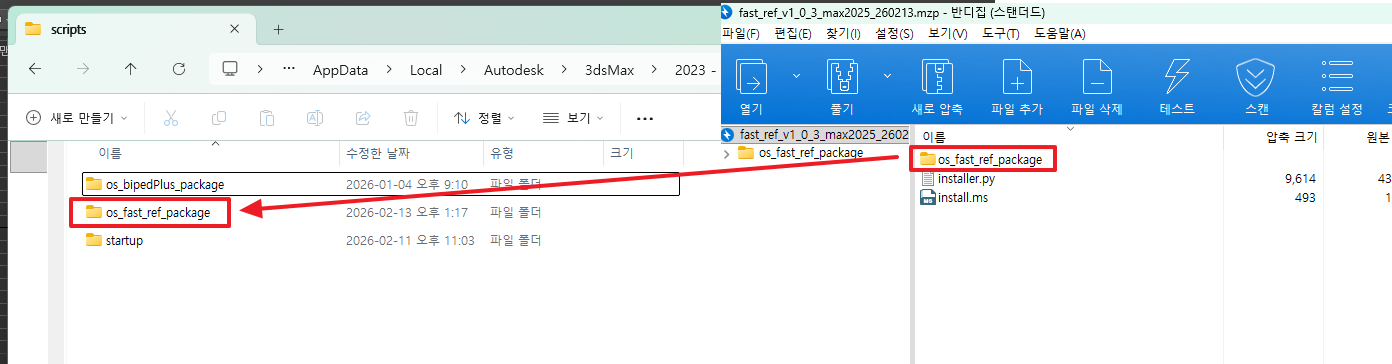
os_fast_ref_package폴더 자체를 통째로 복사해야 합니다. 폴더 안의 파일만 복사하면 안 됩니다.
Step 4. 매크로 및 메뉴 등록
3ds Max의 MAXScript Listener (F11 키)에서 아래 스크립트를 전체 선택 → 복사 → 붙여넣기 후 Enter를 눌러 실행합니다.
이 스크립트는 3ds Max 버전을 자동 감지하여 동작합니다.
- 2025 이상: OS Tools 메뉴 자동 등록
- 2022 ~ 2024: Customize UI 등록 안내
(
    local scriptsDir = getDir #userScripts
    local macrosDir = getDir #userMacros
    local startupDir = getDir #userStartupScripts
    local toolDir = scriptsDir + "\\os_fast_ref_package\\"

    local maxVer = (maxVersion())[1]
    local is2025orLater = maxVer >= 27000

    if not (doesDirectoryExist toolDir) then (
        messageBox "os_fast_ref_package 폴더가 scripts 경로에 없습니다.\n먼저 Step 3을 완료해주세요." title:"오류"
    ) else (
        local macroFile = macrosDir + "\\os_fast_ref.mcr"
        local toolDirSlash = substituteString toolDir "\\" "/"
        local pyCode = "import sys; tool_dir = r'" + toolDirSlash + "'; sys.path.insert(0, tool_dir) if tool_dir not in sys.path else None; from os_fast_ref.main import openWindow; openWindow()"

        local f = createFile macroFile
        format "macroScript Osfastref\n" to:f
        format "    category:\"OtakuSolutions_Tools\"\n" to:f
        format "    toolTip:\"os_fast_ref\"\n" to:f
        format "    buttonText:\"os_fast_ref\"\n" to:f
        format "(\n" to:f
        format "    python.Execute \"%\"\n" pyCode to:f
        format ")\n" to:f
        close f
        macros.load macroFile

        if is2025orLater then (
            local menuSrc = toolDir + "_register_menu.ms"
            local menuDst = startupDir + "\\os_fast_ref_menu.ms"
            if doesFileExist menuSrc then (
                copyFile menuSrc menuDst
            )
            messageBox "설치 완료! 3ds Max를 재시작해주세요.\n\n재시작 후:\n  Main Menu > OS Tools > os_fast_ref" title:"os_fast_ref 설치 완료"
        ) else (
            messageBox "설치 완료! 3ds Max를 재시작해주세요.\n\n실행 방법:\n  Customize > Customize User Interface\n  Category: OtakuSolutions_Tools\n  Button: os_fast_ref\n\n위 버튼을 툴바에 드래그하여 사용하세요." title:"os_fast_ref 설치 완료"
        )
    )
)
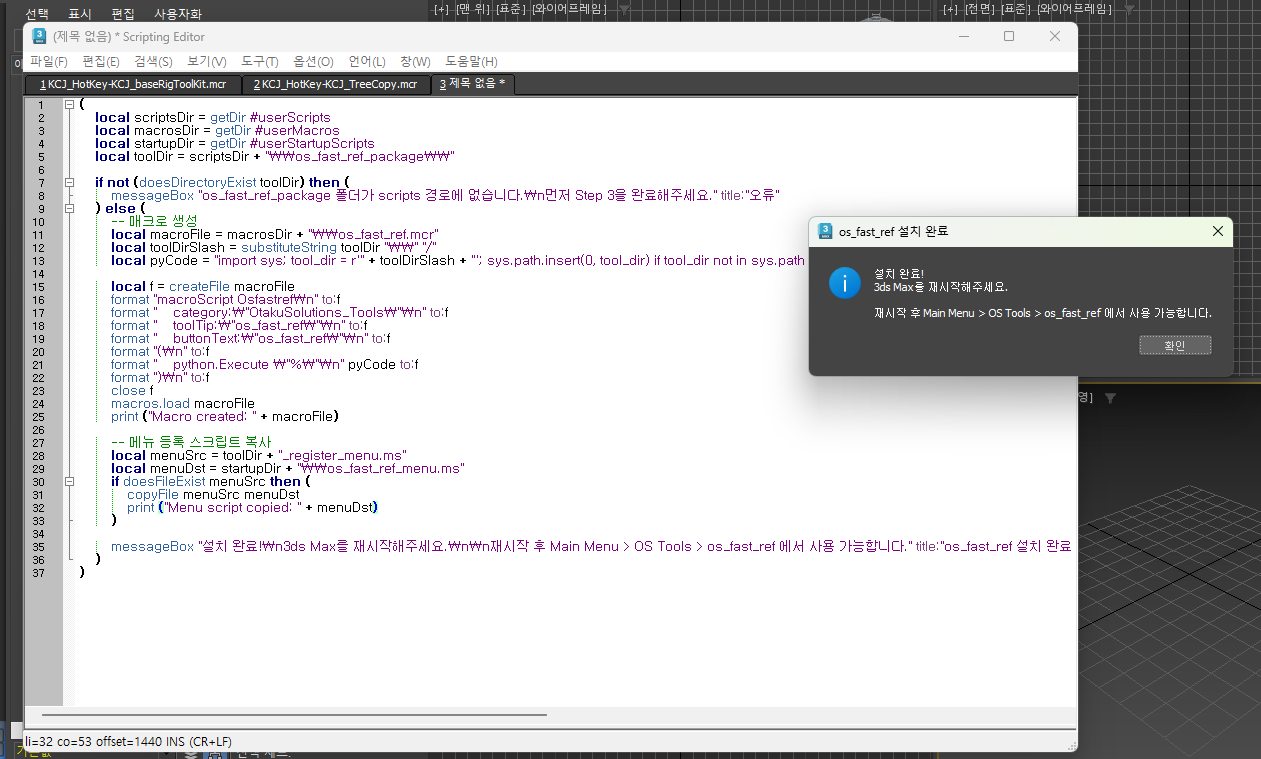
실행이 완료되면 아래와 같은 완료 메시지가 표시됩니다.
Step 5. 3ds Max 재시작
3ds Max를 완전히 종료 후 다시 실행합니다.
Step 6. 실행 확인
| 3ds Max 버전 | 실행 방법 |
|---|---|
| 2025 이상 | 상단 메뉴바 → OS Tools → os_fast_ref |
| 2022 ~ 2024 | Customize → Customize User Interface → Category: OtakuSolutions_Tools → os_fast_ref 버튼을 툴바에 드래그 |
FAQ
Q. Step 4에서 "os_fast_ref_package 폴더가 scripts 경로에 없습니다" 라고 뜹니다.
→ Step 3에서 os_fast_ref_package 폴더가 정확한 위치에 복사되었는지 확인해주세요. getDir #userScripts 로 출력된 경로 바로 아래에 폴더가 있어야 합니다.
Q. 재시작 후에도 OS Tools 메뉴가 보이지 않습니다. (2025)
→ Customize → Customize User Interface → Category: OtakuSolutions_Tools 에서 os_fast_ref 버튼을 직접 툴바에 드래그하여 사용할 수 있습니다.
설치 중 문제가 발생하거나 궁금한 사항이 있으시면 언제든지 연락 주세요.
- OtakuSolutions 고객지원