Common
[FAQ] 解决 "Not an Autodesk path" 安装错误指南
下载 Markdown 含图片下载注意:必须将
os_fast_ref_package文件夹整体复制,不能只复制文件夹内的文件。
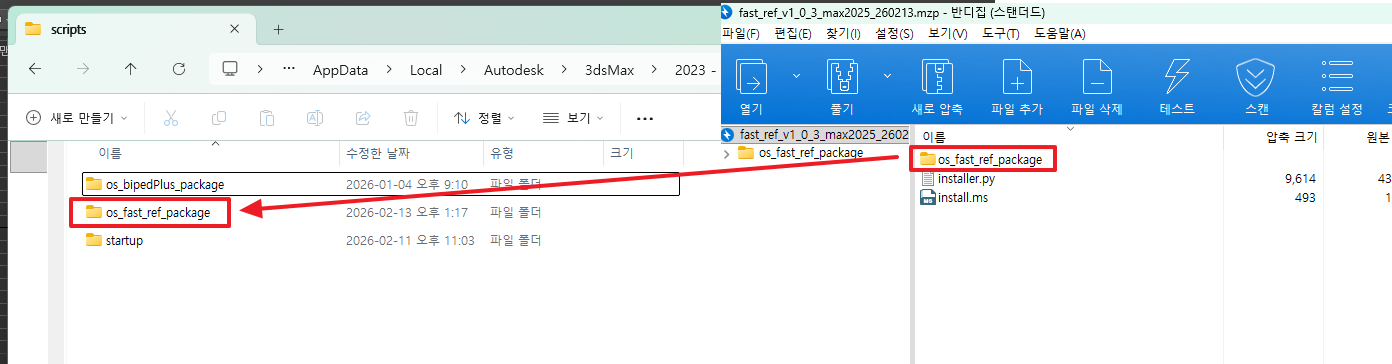
第 4 步. 注册宏与菜单
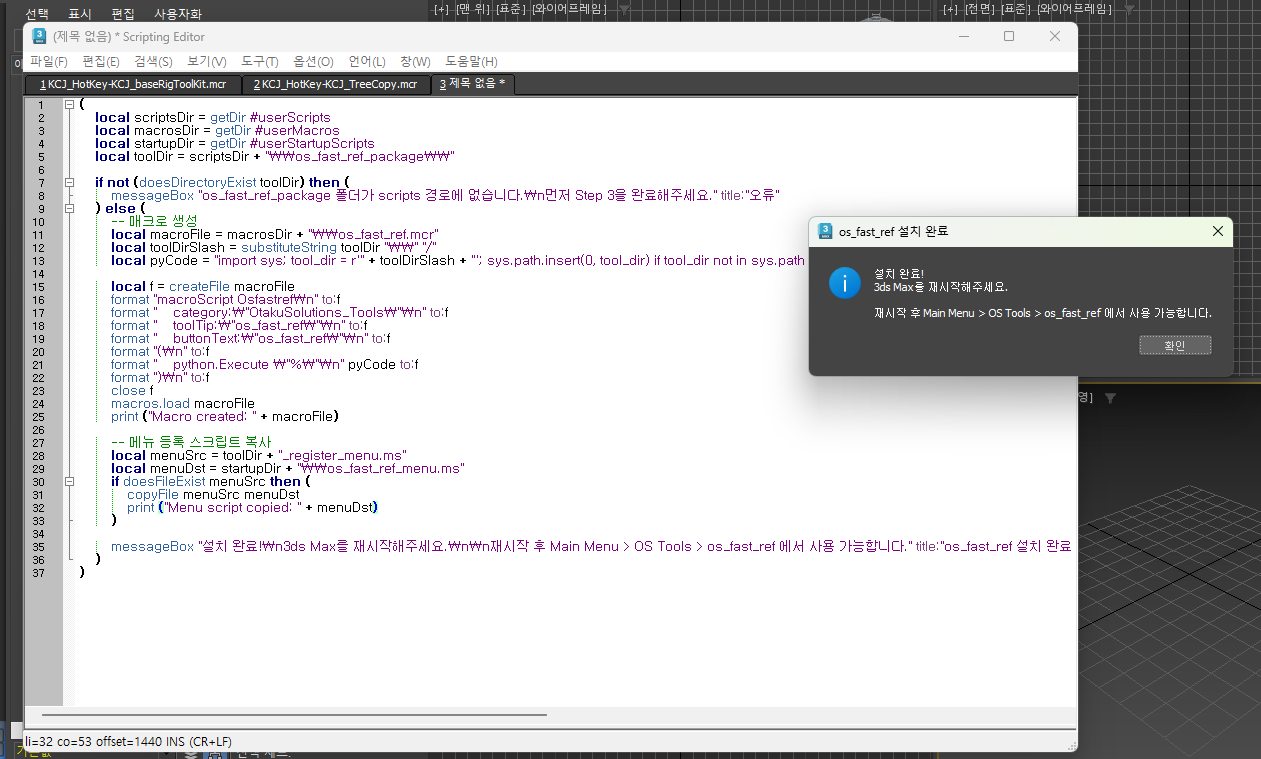
在 3ds Max 的 MAXScript Listener(F11 键)中,全选 → 复制 → 粘贴以下脚本,然后按 Enter 运行。
此脚本会自动检测您的 3ds Max 版本:
- 2025 及以上:自动注册 OS Tools 菜单
- 2022 ~ 2024:引导您通过 Customize UI 注册
(
    local scriptsDir = getDir #userScripts
    local macrosDir = getDir #userMacros
    local startupDir = getDir #userStartupScripts
    local toolDir = scriptsDir + "\\os_fast_ref_package\\"

    local maxVer = (maxVersion())[1]
    local is2025orLater = maxVer >= 27000

    if not (doesDirectoryExist toolDir) then (
        messageBox "在 scripts 路径中找不到 os_fast_ref_package 文件夹。\n请先完成第 3 步。" title:"错误"
    ) else (
        local macroFile = macrosDir + "\\os_fast_ref.mcr"
        local toolDirSlash = substituteString toolDir "\\" "/"
        local pyCode = "import sys; tool_dir = r'" + toolDirSlash + "'; sys.path.insert(0, tool_dir) if tool_dir not in sys.path else None; from os_fast_ref.main import openWindow; openWindow()"

        local f = createFile macroFile
        format "macroScript Osfastref\n" to:f
        format "    category:\"OtakuSolutions_Tools\"\n" to:f
        format "    toolTip:\"os_fast_ref\"\n" to:f
        format "    buttonText:\"os_fast_ref\"\n" to:f
        format "(\n" to:f
        format "    python.Execute \"%\"\n" pyCode to:f
        format ")\n" to:f
        close f
        macros.load macroFile

        if is2025orLater then (
            local menuSrc = toolDir + "_register_menu.ms"
            local menuDst = startupDir + "\\os_fast_ref_menu.ms"
            if doesFileExist menuSrc then (
                copyFile menuSrc menuDst
            )
            messageBox "安装完成!请重启 3ds Max。\n\n重启后:\n  Main Menu > OS Tools > os_fast_ref" title:"os_fast_ref 安装完成"
        ) else (
            messageBox "安装完成!请重启 3ds Max。\n\n启动方式:\n  Customize > Customize User Interface\n  Category: OtakuSolutions_Tools\n  将 os_fast_ref 按钮拖到工具栏" title:"os_fast_ref 安装完成"
        )
    )
)
执行成功后,将显示如下完成提示。
第 5 步. 重启 3ds Max
完全退出 3ds Max 后重新启动。
第 6 步. 确认启动
| 3ds Max 版本 | 启动方式 |
|---|---|
| 2025 及以上 | 顶部菜单栏 → OS Tools → os_fast_ref |
| 2022 ~ 2024 | Customize → Customize User Interface → Category: OtakuSolutions_Tools → 将 os_fast_ref 按钮拖到工具栏 |
FAQ
Q. 第 4 步提示"在 scripts 路径中找不到 os_fast_ref_package 文件夹"。
→ 请确认第 3 步中 os_fast_ref_package 文件夹已复制到正确位置。该文件夹必须位于 getDir #userScripts 输出路径的直属子目录下。
Q. 重启后仍看不到 OS Tools 菜单。(2025)
→ 前往 Customize → Customize User Interface → Category: OtakuSolutions_Tools,将 os_fast_ref 按钮直接拖到工具栏即可。
如果安装过程中遇到问题或有疑问,请随时联系我们。
- OtakuSolutions 客户支持