[FAQ] 3ds Max — インストール済みなのに OS Tools メニューが出ない
Markdownダウンロード 画像込みダウンロード対象: OS Max ツール(Fast Ref、BipedPlus)および Cross DCC ツール(SkinLayer Studio)。
SkinLayer Studio だけの問題ではありません。3ds Max の startup を使う OtakuSolutions ツールで同じことが起き得ます。
こんなとき
次が 同時に 当てはまる場合の記事です。
- 3ds Max のメニューバーに OS Tools がありません。
- OS Max ツールまたは Cross DCC ツールが Max を見つけられません。
- インストーラは up to date / 正常インストールのままです。
- Max とツールを再起動しても変わりません。
- ファイルを手動実行すると動くこともあります。
インストール失敗ではありません。ファイルを入れ直す必要はありません。
この記事ではない場合
メニューに OS Tools は見える のに、SkinLayer Studio の [Re] だけ失敗するなら、
前方の startup スクリプトエラーの可能性があります。そのときはこちらです。
https://docs.otakusolutions.com/guide/skin-layer-studio/faq02-max-manual-connect?lang=ja
なぜ起きるか
Windows 11 がユーザーフォルダ(%LOCALAPPDATA%)に システムフォルダ表示 を付けることがあります。
3ds Max 2021 Update 3 以降 は起動時に startup スクリプトを実行します。
ただしシステム・隠し属性の場所にあるファイルは、セキュリティ上 静かにスキップ します。エラーダイアログは出ません。
コネクタやメニューのファイルは正しい場所にあるのに、Max が自動実行だけしない状態になります。
作業ファイル、シーン、ショートカットはそのままです。フォルダ表示だけ外します。
| すること | |
|---|---|
| Windows 11 | ユーザーフォルダにシステム表示を付けることがある |
| 3ds Max 2021 U3 以降 | システム・隠し位置の startup を実行しない |
対処 — 表示だけ外す
下のスクリプトは ファイルを作ったり消したりしません。 Hidden / System 表示だけ外します。
%LOCALAPPDATA% 自体の Hidden は Windows の初期値のことがあるので触りません。
1. スクリプトを入れる
- 3ds Max で F11(MAXScript Listener)を開きます。
- 下の白い欄 をクリックします。
- 下のコードを 全部 コピーして貼り、Enter を押します。
- ビューポートへドラッグしないでください。
startupフォルダへコピーしないでください。
-- ============================================================================
--  STEP 2 - clear Hidden/System, text only.
--
--  Standalone. Paste this file by itself. It does not need the diagnostic
--  window, and the diagnostic window does not call this file.
--
--  Paste into the Listener (F11), Enter, then RESTART Max.
--  Clears attribute bits only. Creates, moves or deletes nothing.
--    1) SYSTEM on %LOCALAPPDATA% - Win11 24H2 stamps it, and Max then skips
--       every user startup script and macro underneath.
--    2) HIDDEN/SYSTEM on the Max user script folders and our files.
--  Hidden on LOCALAPPDATA itself is left alone: it can be a Windows default
--  there, and clearing it would be an unrequested change to the user's PC.
--
--  ASCII only, on purpose - this runs on machines with any locale.
-- ============================================================================

(
    local localApp = ""
    try ( localApp = systemtools.getEnvVariable "LOCALAPPDATA" ) catch ( localApp = "" )
    local scripts  = getDir #userScripts
    local startup  = getDir #userStartupScripts
    local macros   = getDir #userMacros

    local pkgDirs = #("os_skinLayerStudio_connector", "os_fast_ref_package", "os_bipedPlus_package")
    local ourStartupMs = #(
        "os_sls_connector_launcher.ms", "os_sls_00_menu.ms",
        "os_fast_ref_menu.ms", "os_fast_ref_path.ms",
        "os_bipedPlus_menu.ms", "os_bipedPlus_path.ms"
    )
    local ourMacros = #(
        "sls_connector.mcr", "os_tools_about.mcr",
        "os_fast_ref.mcr", "os_bipedPlus.mcr"
    )

    fn q p = "\"" + p + "\""

    fn runAttrib arg = (
        local cmd = "attrib " + arg
        format "  %\n" cmd
        try ( HiddenDOSCommand cmd ) catch (
            try ( DOSCommand cmd ) catch ( format "    (attrib failed)\n" )
        )
    )

    fn show lbl p = (
        local h = true
        local s = true
        try ( h = getFileAttribute p #hidden ) catch ()
        try ( s = getFileAttribute p #system ) catch ()
        format "  hidden=% system=%  %\n" h s lbl
    )

    fn clearOne p = (
        try ( setFileAttribute p #hidden false ) catch ()
        try ( setFileAttribute p #system false ) catch ()
    )

    format "\n========== STEP2 attrib fix ==========\n"

    -- 1) LOCALAPPDATA: System only. /D is required so attrib treats the
    --    argument as the directory itself and not as a file pattern.
    if localApp != "" then (
        format "\n-- 1) LOCALAPPDATA, System only --\n"
        try ( setFileAttribute localApp #system false ) catch ()
        runAttrib ("-s " + (q localApp) + " /D")
    ) else (
        format "\n-- 1) LOCALAPPDATA not readable, skipped --\n"
    )

    format "\n-- 2) Max user folders --\n"
    for d in #(scripts, startup, macros) do runAttrib ("-h -s " + (q d) + " /D")
    runAttrib ("-h -s " + (q (pathConfig.appendPath startup "*")))
    runAttrib ("-h -s " + (q (pathConfig.appendPath macros  "*")))

    format "\n-- 3) product package folders --\n"
    for nm in pkgDirs do (
        local pkg = pathConfig.appendPath scripts nm
        if doesFileExist pkg do (
            runAttrib ("-h -s " + (q pkg) + " /D")
            runAttrib ("-h -s " + (q (pathConfig.appendPath pkg "*")) + " /S /D")
        )
    )

    -- Belt and braces for environments where attrib.exe is blocked.
    for n in ourStartupMs do clearOne (pathConfig.appendPath startup n)
    for n in ourMacros    do clearOne (pathConfig.appendPath macros  n)

    format "\n-- verify (want system=false everywhere) --\n"
    format "   LOCALAPPDATA may keep hidden=true, that is fine.\n"
    if localApp != "" do show "LOCALAPPDATA" localApp
    show "scripts" scripts
    show "startup" startup
    show "usermacros" macros
    for n in ourStartupMs do (
        local p = pathConfig.appendPath startup n
        if doesFileExist p do show n p
    )
    for n in ourMacros do (
        local p = pathConfig.appendPath macros n
        if doesFileExist p do show n p
    )

    format "\nNext: paste step3_connect_and_menu.ms to use the tool right now.\n"
    format "Then CLOSE Max completely and reopen - paste nothing that time.\n"
    format "=====================================\n"
)
Listener に STEP2 attrib fix ログが出れば成功です。
2. Max を完全終了してから開き直す
この再起動では スクリプトを何も入れないでください。
Max が自分で startup を読むかを確認する段階です。
確認
| 対処前 | 対処後 |
|---|---|
| メニューバーに OS Tools なし | OS Tools メニューが見える |
| ツールが Max を認識しない | Max を付けると自動接続 |
| インストールファイルは既にある | 再インストール不要 |
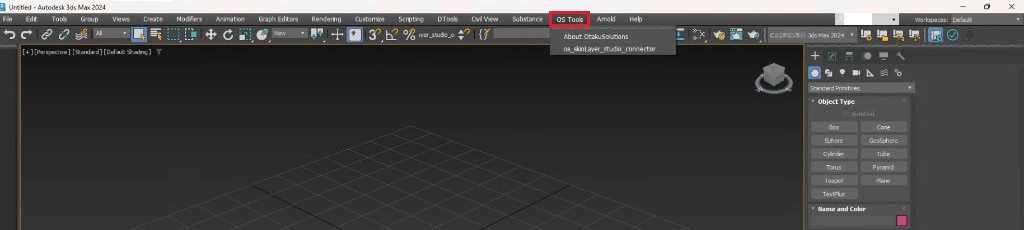
再起動後、メニューバーに OS Tools が見えれば完了です。
追加のインストールやスクリプトは不要です。
しないこと
- 同じファイルを再インストールする
- SkinLayer Studio を管理者として実行すれば直ると期待する
startup内のファイルを消す- こちらが渡していない
.bat/ 実行ファイルを動かす
それでもダメなら
ごくまれに Windows が同じ表示を付け直すことがあります。
またメニューが消えたら、お気軽にご連絡ください。
- フィードバック: https://otakusolutions.com/ja/feedback
- お問い合わせ: https://otakusolutions.com/ja/contact
OS Tools は見えるのに接続だけ失敗する場合は FAQ.2 を見てください。
https://docs.otakusolutions.com/guide/skin-layer-studio/faq02-max-manual-connect?lang=ja