[FAQ] 3ds Max — 已安装,但 OS Tools 菜单不显示
下载 Markdown 含图片下载适用范围: OS Max 工具(Fast Ref、BipedPlus)以及 Cross DCC 工具(SkinLayer Studio)。
不只是 SkinLayer Studio 的问题。凡是走 3ds Max startup 的 OtakuSolutions 工具都可能遇到。
出现这种情况时
以下情况 同时成立 时,看这篇。
- 3ds Max 菜单栏里没有 OS Tools
- OS Max 工具或 Cross DCC 工具找不到 Max
- 安装窗口仍显示 up to date / 安装正常
- 重启 Max 和工具后还是一样
- 有时手动运行文件是可以的
这不是安装失败。不必把文件再装一遍。
如果不是这种情况
菜单里 能看到 OS Tools,只是 SkinLayer Studio 的 [Re] 失败,
可能是前面的 startup 脚本报错。请看这篇:
https://docs.otakusolutions.com/guide/skin-layer-studio/faq02-max-manual-connect?lang=zh
为什么会这样
Windows 11 有时会给用户文件夹(%LOCALAPPDATA%)打上 系统文件夹标记。
3ds Max 2021 Update 3 及以后 启动时会执行 startup 脚本。
但如果位置被标成系统或隐藏,Max 会出于安全 静默跳过,也不会弹出错误。
连接器和菜单文件其实在正确位置,只是 Max 没有自动执行。
工程、场景、快捷键都不会动。只需清掉文件夹标记。
| 会做什么 | |
|---|---|
| Windows 11 | 有时给用户文件夹打系统标记 |
| 3ds Max 2021 U3 及以后 | 不执行系统/隐藏位置里的 startup |
处理 — 只去掉标记
下面的脚本 不会创建或删除文件,只去掉 Hidden / System 标记。
%LOCALAPPDATA% 本身的 Hidden 可能是 Windows 默认,不会动它。
1. 粘贴脚本
- 在 3ds Max 里打开 F11(MAXScript Listener)。
- 点击 下方白色区域。
- 整段复制下面的代码,粘贴后按 Enter。
- 不要拖到视口。不要复制到
startup文件夹。
-- ============================================================================
--  STEP 2 - clear Hidden/System, text only.
--
--  Standalone. Paste this file by itself. It does not need the diagnostic
--  window, and the diagnostic window does not call this file.
--
--  Paste into the Listener (F11), Enter, then RESTART Max.
--  Clears attribute bits only. Creates, moves or deletes nothing.
--    1) SYSTEM on %LOCALAPPDATA% - Win11 24H2 stamps it, and Max then skips
--       every user startup script and macro underneath.
--    2) HIDDEN/SYSTEM on the Max user script folders and our files.
--  Hidden on LOCALAPPDATA itself is left alone: it can be a Windows default
--  there, and clearing it would be an unrequested change to the user's PC.
--
--  ASCII only, on purpose - this runs on machines with any locale.
-- ============================================================================

(
    local localApp = ""
    try ( localApp = systemtools.getEnvVariable "LOCALAPPDATA" ) catch ( localApp = "" )
    local scripts  = getDir #userScripts
    local startup  = getDir #userStartupScripts
    local macros   = getDir #userMacros

    local pkgDirs = #("os_skinLayerStudio_connector", "os_fast_ref_package", "os_bipedPlus_package")
    local ourStartupMs = #(
        "os_sls_connector_launcher.ms", "os_sls_00_menu.ms",
        "os_fast_ref_menu.ms", "os_fast_ref_path.ms",
        "os_bipedPlus_menu.ms", "os_bipedPlus_path.ms"
    )
    local ourMacros = #(
        "sls_connector.mcr", "os_tools_about.mcr",
        "os_fast_ref.mcr", "os_bipedPlus.mcr"
    )

    fn q p = "\"" + p + "\""

    fn runAttrib arg = (
        local cmd = "attrib " + arg
        format "  %\n" cmd
        try ( HiddenDOSCommand cmd ) catch (
            try ( DOSCommand cmd ) catch ( format "    (attrib failed)\n" )
        )
    )

    fn show lbl p = (
        local h = true
        local s = true
        try ( h = getFileAttribute p #hidden ) catch ()
        try ( s = getFileAttribute p #system ) catch ()
        format "  hidden=% system=%  %\n" h s lbl
    )

    fn clearOne p = (
        try ( setFileAttribute p #hidden false ) catch ()
        try ( setFileAttribute p #system false ) catch ()
    )

    format "\n========== STEP2 attrib fix ==========\n"

    -- 1) LOCALAPPDATA: System only. /D is required so attrib treats the
    --    argument as the directory itself and not as a file pattern.
    if localApp != "" then (
        format "\n-- 1) LOCALAPPDATA, System only --\n"
        try ( setFileAttribute localApp #system false ) catch ()
        runAttrib ("-s " + (q localApp) + " /D")
    ) else (
        format "\n-- 1) LOCALAPPDATA not readable, skipped --\n"
    )

    format "\n-- 2) Max user folders --\n"
    for d in #(scripts, startup, macros) do runAttrib ("-h -s " + (q d) + " /D")
    runAttrib ("-h -s " + (q (pathConfig.appendPath startup "*")))
    runAttrib ("-h -s " + (q (pathConfig.appendPath macros  "*")))

    format "\n-- 3) product package folders --\n"
    for nm in pkgDirs do (
        local pkg = pathConfig.appendPath scripts nm
        if doesFileExist pkg do (
            runAttrib ("-h -s " + (q pkg) + " /D")
            runAttrib ("-h -s " + (q (pathConfig.appendPath pkg "*")) + " /S /D")
        )
    )

    -- Belt and braces for environments where attrib.exe is blocked.
    for n in ourStartupMs do clearOne (pathConfig.appendPath startup n)
    for n in ourMacros    do clearOne (pathConfig.appendPath macros  n)

    format "\n-- verify (want system=false everywhere) --\n"
    format "   LOCALAPPDATA may keep hidden=true, that is fine.\n"
    if localApp != "" do show "LOCALAPPDATA" localApp
    show "scripts" scripts
    show "startup" startup
    show "usermacros" macros
    for n in ourStartupMs do (
        local p = pathConfig.appendPath startup n
        if doesFileExist p do show n p
    )
    for n in ourMacros do (
        local p = pathConfig.appendPath macros n
        if doesFileExist p do show n p
    )

    format "\nNext: paste step3_connect_and_menu.ms to use the tool right now.\n"
    format "Then CLOSE Max completely and reopen - paste nothing that time.\n"
    format "=====================================\n"
)
Listener 里出现 STEP2 attrib fix 日志即表示这一步完成。
2. 完全退出 Max,再重新打开
这次重启 不要粘贴任何脚本。
用来确认 Max 是否会自己读取 startup。
确认
| 处理前 | 处理后 |
|---|---|
| 菜单栏没有 OS Tools | 能看到 OS Tools 菜单 |
| 工具识别不到 Max | 打开 Max 后自动连接 |
| 安装文件本来就在 | 无需重装 |
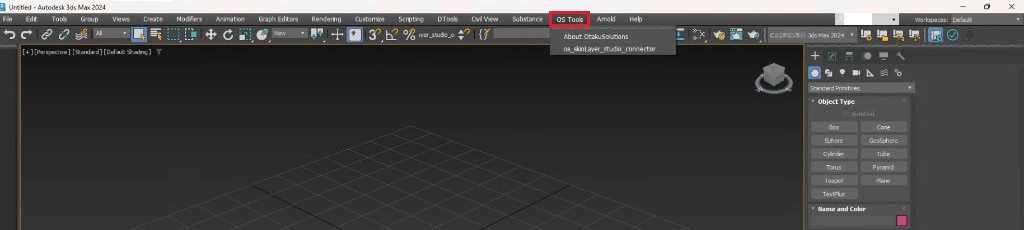
重启后菜单栏出现 OS Tools,即表示完成。
不必再安装,也不必再贴脚本。
不要做
- 把同一套文件再装一遍
- 指望用管理员身份运行 SkinLayer Studio 就能好
- 删除
startup里的文件 - 运行我们没有提供的
.bat/ 可执行文件
还是不行?
极少数情况下 Windows 会再次打上同样的标记。
如果之后打开 Max 菜单又没了,请告诉我们。
- 反馈:https://otakusolutions.com/zh/feedback
- 联系:https://otakusolutions.com/zh/contact
能看到 OS Tools 但连接仍失败时,请看 FAQ.2。
https://docs.otakusolutions.com/guide/skin-layer-studio/faq02-max-manual-connect?lang=zh