[FAQ] 3ds Max — 설치는 됐는데 OS Tools 메뉴가 안 보일 때
마크다운 다운로드 이미지 포함 다운로드대상: OS Max 툴(Fast Ref, BipedPlus) 및 Cross DCC 툴(SkinLayer Studio).
SkinLayer Studio만의 문제가 아닙니다. 3ds Max startup을 쓰는 OtakuSolutions 툴에서 같이 발생할 수 있습니다.
이런 상황일 때
아래가 동시에 해당되면 이 글의 경우입니다.
- 3ds Max 메뉴바에 OS Tools 가 없습니다.
- OS Max 툴 또는 Cross DCC 툴이 Max를 찾지 못합니다.
- 설치 창은 up to date / 정상 설치로 보입니다.
- Max와 툴을 다시 시작해도 같습니다.
- 파일을 수동으로 실행하면 동작하는 경우도 있습니다.
설치가 잘못된 것이 아닙니다. 빠진 파일을 다시 넣을 필요가 없습니다.
이 글이 아닌 경우
메뉴바에 OS Tools는 보이는데, SkinLayer Studio에서 [Re] 만 실패한다면
앞쪽 startup 스크립트 오류일 수 있습니다. 그때는 아래를 보세요.
https://docs.otakusolutions.com/guide/skin-layer-studio/faq02-max-manual-connect?lang=ko
왜 이런가
Windows 11이 사용자 폴더(%LOCALAPPDATA%)에 시스템 폴더 표시를 붙이는 경우가 있습니다.
3ds Max 2021 Update 3 이후는 시작 시 startup 스크립트를 실행하도록 되어 있습니다.
다만 시스템·숨김으로 표시된 위치의 파일은 보안상 조용히 건너뜁니다. 에러 창도 안 뜹니다.
그래서 커넥터·메뉴 파일은 올바른 자리에 있는데, Max가 자동 실행만 안 하는 상태가 됩니다.
작업 파일, 씬, 단축키는 그대로입니다. 폴더 표시만 정리하면 됩니다.
| 하는 일 | |
|---|---|
| Windows 11 | 사용자 폴더에 시스템 표시를 붙이기도 함 |
| 3ds Max 2021 U3 이후 | 시스템·숨김 위치의 startup을 실행하지 않음 |
해결 — 표시만 해제
아래 스크립트는 파일을 만들거나 지우지 않습니다. Hidden / System 표시만 뗍니다.
%LOCALAPPDATA% 자체의 Hidden 표시는 Windows 기본일 수 있어 건드리지 않습니다.
1. 스크립트 넣기
- 3ds Max에서 F11 (MAXScript Listener)을 엽니다.
- 아래쪽 흰 칸을 클릭합니다.
- 아래 코드를 전부 복사해 붙여넣고 Enter 를 누릅니다.
- 뷰포트에 드래그하지 마세요.
startup폴더에 복사하지 마세요.
-- ============================================================================
--  STEP 2 - clear Hidden/System, text only.
--
--  Standalone. Paste this file by itself. It does not need the diagnostic
--  window, and the diagnostic window does not call this file.
--
--  Paste into the Listener (F11), Enter, then RESTART Max.
--  Clears attribute bits only. Creates, moves or deletes nothing.
--    1) SYSTEM on %LOCALAPPDATA% - Win11 24H2 stamps it, and Max then skips
--       every user startup script and macro underneath.
--    2) HIDDEN/SYSTEM on the Max user script folders and our files.
--  Hidden on LOCALAPPDATA itself is left alone: it can be a Windows default
--  there, and clearing it would be an unrequested change to the user's PC.
--
--  ASCII only, on purpose - this runs on machines with any locale.
-- ============================================================================

(
    local localApp = ""
    try ( localApp = systemtools.getEnvVariable "LOCALAPPDATA" ) catch ( localApp = "" )
    local scripts  = getDir #userScripts
    local startup  = getDir #userStartupScripts
    local macros   = getDir #userMacros

    local pkgDirs = #("os_skinLayerStudio_connector", "os_fast_ref_package", "os_bipedPlus_package")
    local ourStartupMs = #(
        "os_sls_connector_launcher.ms", "os_sls_00_menu.ms",
        "os_fast_ref_menu.ms", "os_fast_ref_path.ms",
        "os_bipedPlus_menu.ms", "os_bipedPlus_path.ms"
    )
    local ourMacros = #(
        "sls_connector.mcr", "os_tools_about.mcr",
        "os_fast_ref.mcr", "os_bipedPlus.mcr"
    )

    fn q p = "\"" + p + "\""

    fn runAttrib arg = (
        local cmd = "attrib " + arg
        format "  %\n" cmd
        try ( HiddenDOSCommand cmd ) catch (
            try ( DOSCommand cmd ) catch ( format "    (attrib failed)\n" )
        )
    )

    fn show lbl p = (
        local h = true
        local s = true
        try ( h = getFileAttribute p #hidden ) catch ()
        try ( s = getFileAttribute p #system ) catch ()
        format "  hidden=% system=%  %\n" h s lbl
    )

    fn clearOne p = (
        try ( setFileAttribute p #hidden false ) catch ()
        try ( setFileAttribute p #system false ) catch ()
    )

    format "\n========== STEP2 attrib fix ==========\n"

    -- 1) LOCALAPPDATA: System only. /D is required so attrib treats the
    --    argument as the directory itself and not as a file pattern.
    if localApp != "" then (
        format "\n-- 1) LOCALAPPDATA, System only --\n"
        try ( setFileAttribute localApp #system false ) catch ()
        runAttrib ("-s " + (q localApp) + " /D")
    ) else (
        format "\n-- 1) LOCALAPPDATA not readable, skipped --\n"
    )

    format "\n-- 2) Max user folders --\n"
    for d in #(scripts, startup, macros) do runAttrib ("-h -s " + (q d) + " /D")
    runAttrib ("-h -s " + (q (pathConfig.appendPath startup "*")))
    runAttrib ("-h -s " + (q (pathConfig.appendPath macros  "*")))

    format "\n-- 3) product package folders --\n"
    for nm in pkgDirs do (
        local pkg = pathConfig.appendPath scripts nm
        if doesFileExist pkg do (
            runAttrib ("-h -s " + (q pkg) + " /D")
            runAttrib ("-h -s " + (q (pathConfig.appendPath pkg "*")) + " /S /D")
        )
    )

    -- Belt and braces for environments where attrib.exe is blocked.
    for n in ourStartupMs do clearOne (pathConfig.appendPath startup n)
    for n in ourMacros    do clearOne (pathConfig.appendPath macros  n)

    format "\n-- verify (want system=false everywhere) --\n"
    format "   LOCALAPPDATA may keep hidden=true, that is fine.\n"
    if localApp != "" do show "LOCALAPPDATA" localApp
    show "scripts" scripts
    show "startup" startup
    show "usermacros" macros
    for n in ourStartupMs do (
        local p = pathConfig.appendPath startup n
        if doesFileExist p do show n p
    )
    for n in ourMacros do (
        local p = pathConfig.appendPath macros n
        if doesFileExist p do show n p
    )

    format "\nNext: paste step3_connect_and_menu.ms to use the tool right now.\n"
    format "Then CLOSE Max completely and reopen - paste nothing that time.\n"
    format "=====================================\n"
)
Listener에 STEP2 attrib fix 로그가 보이면 된 것입니다.
2. Max를 완전히 종료한 뒤 다시 켜기
이번 재시작에는 아무 스크립트도 넣지 마세요.
Max가 스스로 startup을 읽는지 확인하는 단계입니다.
확인
| 조치 전 | 조치 후 |
|---|---|
| 메뉴바에 OS Tools 없음 | OS Tools 메뉴가 보임 |
| 툴이 Max를 인식하지 못함 | Max를 켜면 자동 연결 |
| 설치 파일은 이미 있음 | 재설치 불필요 |
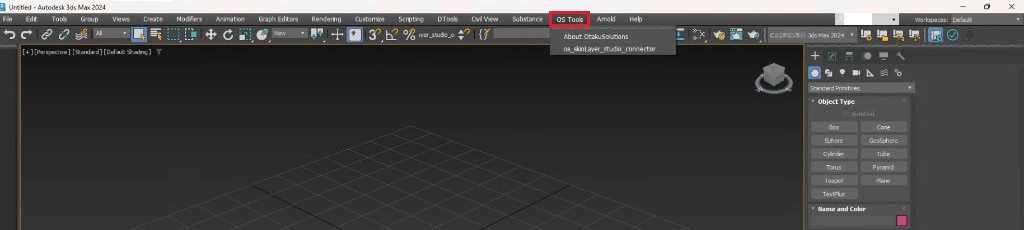
재시작 후 메뉴바에 OS Tools 가 보이면 성공입니다.
추가로 설치하거나 스크립트를 넣으실 필요는 없습니다.
하지 말 것
- 같은 파일을 다시 설치하기
- SkinLayer Studio를 관리자 권한으로 실행하면 해결될 것으로 기대하기
startup안의 파일을 지우기- 우리가 드리지 않은
.bat/ 실행 파일 돌리기
그래도 안 되면
아주 드물게 Windows가 같은 표시를 다시 붙이는 경우가 있습니다.
메뉴가 또 없다면 편하게 알려 주세요.
- 피드백: https://otakusolutions.com/ko/feedback
- 문의: https://otakusolutions.com/ko/contact
OS Tools는 보이는데 연결만 안 되면 FAQ.2를 보세요.
https://docs.otakusolutions.com/guide/skin-layer-studio/faq02-max-manual-connect?lang=ko