[FAQ] Fixing the "Not an Autodesk path" Installation Error
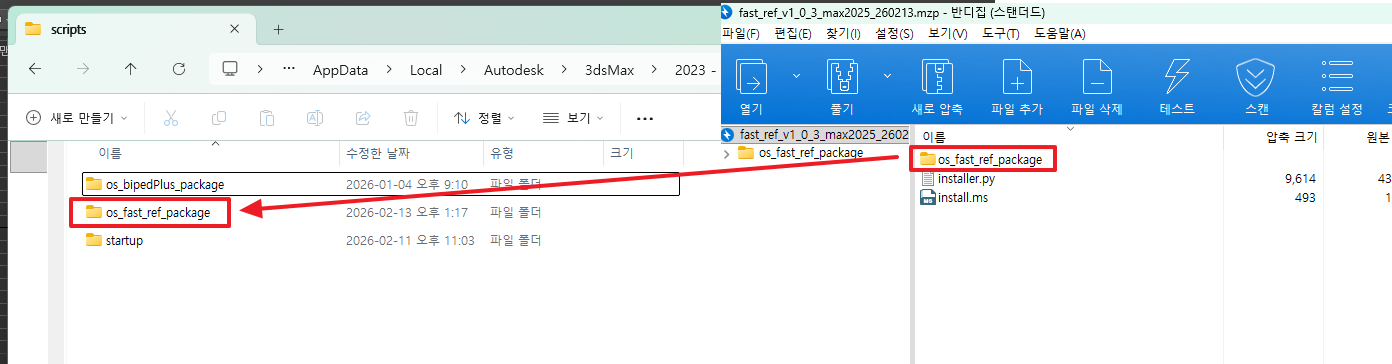
Download Markdown Download with ImagesNote: You must copy the
os_fast_ref_packagefolder itself — not just the files inside it.
Step 4. Register Macros and Menus
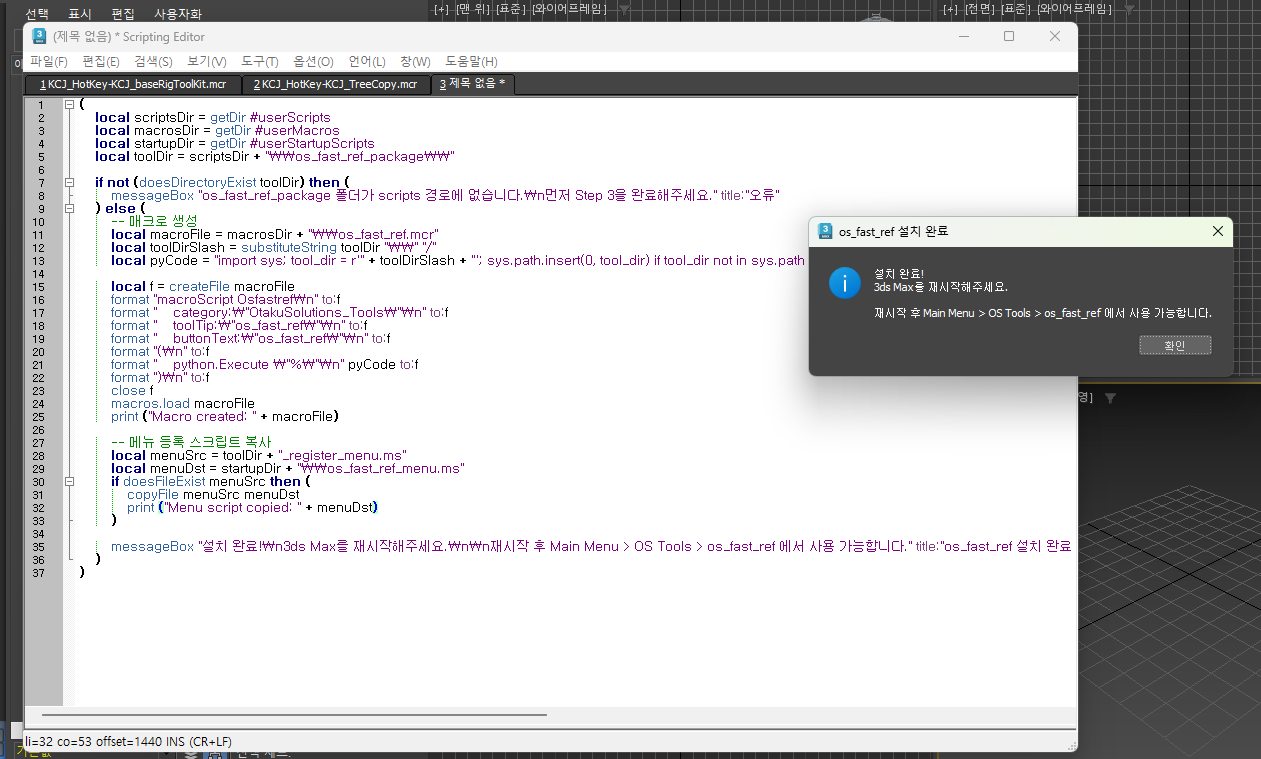
In the 3ds Max MAXScript Listener (F11), select all → copy → paste the script below, then press Enter to run it.
This script automatically detects your 3ds Max version:
- 2025 and later: Auto-registers the OS Tools menu
- 2022 ~ 2024: Guides you to register via Customize UI
(
    local scriptsDir = getDir #userScripts
    local macrosDir = getDir #userMacros
    local startupDir = getDir #userStartupScripts
    local toolDir = scriptsDir + "\\os_fast_ref_package\\"

    local maxVer = (maxVersion())[1]
    local is2025orLater = maxVer >= 27000

    if not (doesDirectoryExist toolDir) then (
        messageBox "os_fast_ref_package folder not found in scripts path.\nPlease complete Step 3 first." title:"Error"
    ) else (
        local macroFile = macrosDir + "\\os_fast_ref.mcr"
        local toolDirSlash = substituteString toolDir "\\" "/"
        local pyCode = "import sys; tool_dir = r'" + toolDirSlash + "'; sys.path.insert(0, tool_dir) if tool_dir not in sys.path else None; from os_fast_ref.main import openWindow; openWindow()"

        local f = createFile macroFile
        format "macroScript Osfastref\n" to:f
        format "    category:\"OtakuSolutions_Tools\"\n" to:f
        format "    toolTip:\"os_fast_ref\"\n" to:f
        format "    buttonText:\"os_fast_ref\"\n" to:f
        format "(\n" to:f
        format "    python.Execute \"%\"\n" pyCode to:f
        format ")\n" to:f
        close f
        macros.load macroFile

        if is2025orLater then (
            local menuSrc = toolDir + "_register_menu.ms"
            local menuDst = startupDir + "\\os_fast_ref_menu.ms"
            if doesFileExist menuSrc then (
                copyFile menuSrc menuDst
            )
            messageBox "Installation complete! Please restart 3ds Max.\n\nAfter restart:\n  Main Menu > OS Tools > os_fast_ref" title:"os_fast_ref Installation Complete"
        ) else (
            messageBox "Installation complete! Please restart 3ds Max.\n\nTo launch:\n  Customize > Customize User Interface\n  Category: OtakuSolutions_Tools\n  Drag the os_fast_ref button to your toolbar." title:"os_fast_ref Installation Complete"
        )
    )
)
When completed successfully, a confirmation message will appear.
Step 5. Restart 3ds Max
Fully quit and relaunch 3ds Max.
Step 6. Verify Launch
| 3ds Max Version | How to Launch |
|---|---|
| 2025 and later | Top menu bar → OS Tools → os_fast_ref |
| 2022 ~ 2024 | Customize → Customize User Interface → Category: OtakuSolutions_Tools → Drag os_fast_ref to your toolbar |
FAQ
Q. Step 4 says "os_fast_ref_package folder not found in scripts path."
→ Please check that the os_fast_ref_package folder was copied to the correct location in Step 3. The folder must be placed directly under the path printed by getDir #userScripts.
Q. After restarting, I can't see the OS Tools menu. (2025)
→ Go to Customize → Customize User Interface → Category: OtakuSolutions_Tools and drag the os_fast_ref button directly onto your toolbar.
If you have any issues or questions during installation, feel free to contact us anytime.
- OtakuSolutions Customer Support