Ep.18 — Customizing 03: Naming & Team Template
Download Markdown Download with ImagesThis document explains how to adapt BipedPlus naming to your studio conventions and save it as a reusable common template.
1. Why It's Needed
When BipedPlus default naming (Skin_*, Ctrl_*, Bip001) doesn't match your team's rules, workflows get blocked.
You can rename them — the key is saving the result as a template so you never repeat the rename process.
2. Full Pipeline
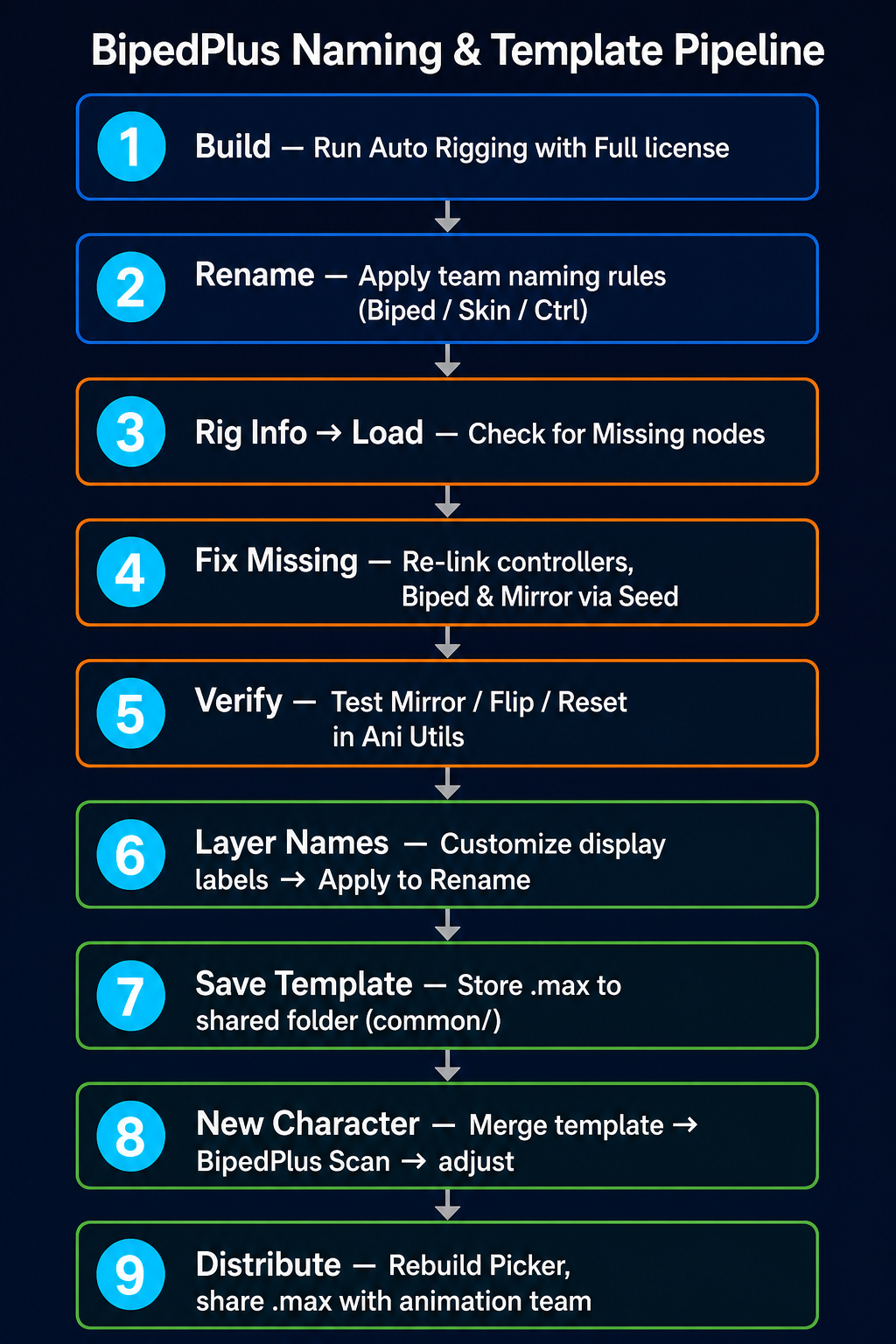
3. Naming — Allowed Range and Cautions
| Type | Content |
|---|---|
| ✅ Can change | Biped name, Skin bone name (to match engine bone names), Controller prefix, Layer display name |
| ⚠️ Caution | Use a consistent batch rule to avoid breaking Hierarchy / Constraint / Space |
| ❌ Do not skip Fix Missing | Skipping Fix Missing after rename breaks Mirror / Picker / Reset |
4. Fix Missing — Keeping the System in Sync After Rename
When names change, INFO records get out of sync, causing Missing errors.
| Concept | Description |
|---|---|
| Seed | A unique address value that identifies a node even after it's renamed |
| Fix Missing | Uses Seed to re-link the renamed node |
Procedure: Rig Info → Load → Check Missing → Run Fix Missing → Confirm Mirror updated → Verify with Ani Utils
5. Layer Name Customization
Layer settings → Edit Name → New preset (team/product name) → Add prefix/suffix → Apply to Rename
Keep the role classification in Hierarchy — only change the display label to match your team.
6. Save as common Template
| Step | Content |
|---|---|
| 1 | Open modeling scene (or New File) |
| 2 | Merge — all nodes from common/BP_Human_Template.max |
| 3 | BipedPlus Scan — confirm INFO / mirror is retained |
| 4 | Adjust Figure / proportions per character |
| 5 | Save to character folder → distribute to animation team (work with Player) |
shared_rigging/
├── character_A/
├── character_B/
└── common/
    └── BP_Human_Template.max   ← Master with naming, layers, and INFO configured
7. Picker Exception
| INFO / Ani Utils (after Fix Missing) | Picker | |
|---|---|---|
| After rename | Recoverable | Name-based — layout may break |
Recommended: After naming and template are finalized, rebuild Picker with the new naming and distribute with the template .max.
Check the Picker file location in BipedPlus Settings.
8. Checklist
- [ ] Team bone / Ctrl / Layer naming rules are documented
- [ ] Batch rename using the example script (or team script)
- [ ] After rename: Fix Missing + Mirror / Reset verified
- [ ]
common/template.maxexists in shared folder - [ ] New characters use Merge → Scan workflow
- [ ] Picker rebuilt based on final naming
- [ ] Animation team uses Player with the same installer
Example Rename Script (handle 2-pass)
Edit NODE_RENAME_MAP to match your team's rules. Run in Max Script Editor after Build.
# -*- coding: utf-8 -*-
"""BipedPlus naming example (handle 2-pass, short version)"""

import pymxs
rt = pymxs.runtime

NODE_RENAME_MAP = [
    ("Bip001",          "Bip009"),
    ("Bip001 Pelvis",   "Bip009 Pelvis"),
    ("Ctrl_Head",       "CTL_Head"),
    ("Skin_Spine1",     "Bip001_Spine1"),
    ("Skin_L_Hand",     "Bip001_L_Hand"),
]

def rename_nodes_by_handle(rename_map=None):
    mapping = rename_map if rename_map is not None else NODE_RENAME_MAP
    if not mapping:
        raise ValueError("NODE_RENAME_MAP is empty.")

    # Phase 1 — collect handles
    collected = []
    for src, dst in mapping:
        node = rt.getNodeByName(src)
        if node is None:
            print(f"[SKIP] {src}")
            continue
        collected.append((int(node.handle), src, dst))

    if not collected:
        raise ValueError("No rename targets found in scene.")

    # Phase 2 — apply
    for handle, src, dst in collected:
        node = rt.maxOps.getNodeByHandle(handle)
        if node is None:
            raise RuntimeError(f"handle={handle} restore failed ({src} → {dst})")
        node.name = dst
        print(f"[OK] {src} → {dst}")

    print(f"Done ({len(collected)} ok). Next: Rig Info → Fix Missing")

if __name__ == "__main__":
    rename_nodes_by_handle()
After running: Rig Info → Fix Missing → verify Mirror / Reset.