BipedPlus
Ep.7 — Edit Utils · Quick Connect · Bone Stretch/Squash
Download Markdown Download with Images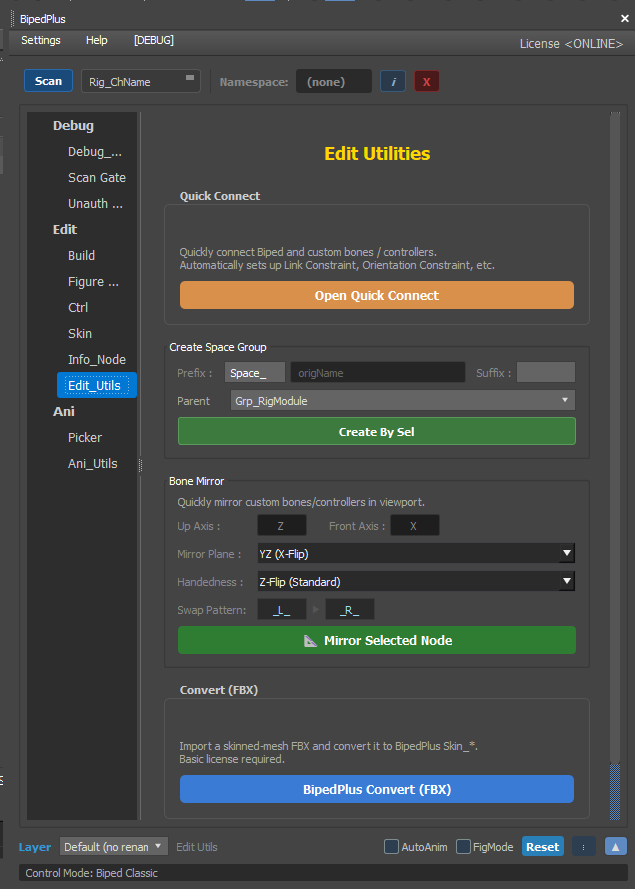
Overview
The Edit Utils tab contains tools used during the rig editing and connection phase.
Its role differs from Ani Utils (animation) — riggers and TAs primarily use Edit Utils when modifying the rig.
Edit Utils vs Ani Utils
| Tab | Who · When | Examples |
|---|---|---|
| Edit Utils | When creating or modifying rigging | Bone connection, disabling Stretch |
| Ani Utils | When animating | Keys, pose mirror, reset |
Quick Connect — Linking Controllers to Bones
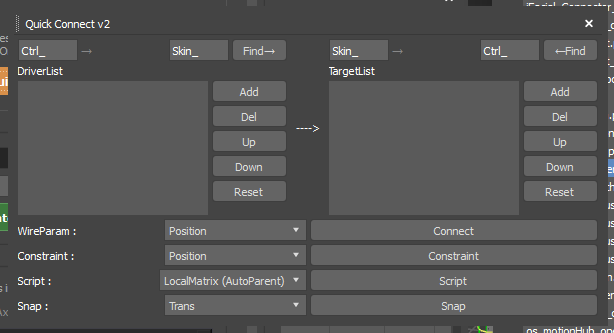
Connects "move this controller and that bone follows" in one step.
Steps (video order)
- Open Edit Utils → Quick Connect area.
- Add the driver side (controllers) to the controller list.
- Add the driven side (skin bones, etc.) to the bone list.
- Find — auto-selects name-matched pairs like Left Arm ↔ Left Arm.
- Select Local Matrix Auto Parent as the connection method → click Connect.
- Move the controller and verify that the bone follows.
Why Local Matrix Auto Parent is recommended: The structure is simple, and it tends to keep position and rotation close to 0 after connection (also related to simulation tools and Spring Magic in Ep.11).
Other Connection Methods
- Supports multiple methods such as Point Constraint and Wire Parameters.
- In most cases, Local Matrix Auto Parent alone is sufficient.
Turning Off Stretch / Squash
BipedPlus supports Stretch & Squash, but not every bone needs it enabled at all times.
Why Turn It Off
- When scale is applied to a bone with Stretch enabled, the skinned mesh may stretch along with it.
- Bones that will not use Squash & Stretch animation should have the Stretch option set to OFF.
How To
- Select the target bone in Edit Utils.
- Turn off the Stretch / Squash related option.
- Also check Align related options.
- Test pose and scale → confirm that the skin tears less.
This option may not be available in the Max default Skin Modifier alone, so it is managed in BipedPlus Edit Utils.
Custom Bone Length (Bone Tip)
- Adjust the bone tip length in the viewport for a cleaner appearance (video second half).
- Using this with Stretch OFF cleans up the display only without affecting animation.
Notes
- Matching naming conventions (Left/Right, Ctrl prefix, etc.) before connecting makes Find accurate.
- Stacking multiple connection types can cause conflicts → prioritize Local Matrix Auto Parent.
- Decide in advance which bones will have Stretch ON for animation effect and which will be OFF.