Ep.19 — BipedPlus Convert (FBX)
Download Markdown Download with Images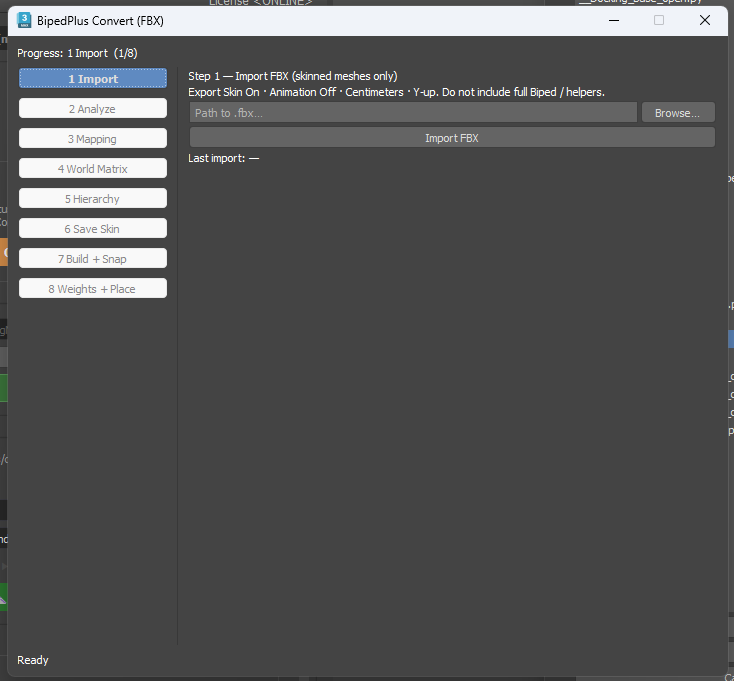
Overview
BipedPlus Convert (FBX) is an 8-step pipeline that brings an existing skinned rig into BipedPlus Skin_* naming and hierarchy.
The Skin tab only recognizes rigs built inside BipedPlus**; foreign rigs will not appear there until you convert.
Requires a verified Basic license (Player, Trial, and unverified accounts are blocked).
Preparation
- Unfreeze All in the scene before export.
- Prefer exporting Skinned Mesh + Bone Tree only (minimal set reduces surprises).
- Match Step 1 UI export settings: Export Skin On · Animation Off · Centimeters · Y-up; no full Biped, helpers, or controllers.
- FBX drops controls and live Biped links but keeps the engine baseline (bones, meshes, morphs) easy to analyze.
Open
Edit → Edit_Utils → BipedPlus Convert (FBX)
Why FBX
Your original twist, skirt, or custom hierarchy is unknown, but engine-style FBX (bone tree + skinned meshes + morphs) is a simple shared baseline—easier to analyze than a live full Biped rig.
Steps 1–8 (UI order)
| Step | Role |
|---|---|
| 1 Import | Skinned FBX; confirm Yes on new-session warning |
| 2 Analyze | Mesh/morph/height/spine·neck·leg counts; Unparent meshes stuck under bones |
| 3 Mapping | Rename to Skin_*; Second Analysis for twist count; Confirm (optional: twist 3 with Double Knee link-3) |
| 4 World Matrix | Init Snap for Figure/IK; store detected custom bone hierarchies |
| 5 Hierarchy | After build, reparent custom bones onto new Skin hierarchy (demo runs this after step 7) |
| 6 Save Skin | Persist mapped skin data; Legacy prefix on old bones (mesh/morph names unchanged) |
| 7 Build + Snap | Apply link counts; optional Double Knee / Unreal; Build → Snap Init Control from Snapshot |
| 8 Weights + Place | Load skinning (may take minutes); place morpher → System Group, mesh → Modeling Group |
Cleanup & after
- Intermediate files land in the user folder—delete manually when done; remove Legacy bones.
- Resize biped display, test pose/reset, Double Knee, squash & stretch.
Full vs Partial
Shipping now: Full Version Converting (heavy rename; may clash with engine animation bone names). Partial Converting (keep more original naming, use BipedPlus animation tools) is planned later.
Related
Ep.20 Convert Tip (Weight→Seg · .fig) · Ep.1 · Ep.5–7 · Ep.16–18 · B.1–B.3