FAQ.3 — Maya connector does not start automatically
Download Markdown Download with ImagesOverview
The connector files can be installed, and Maya can still be missing from SkinLayer Studio.
A plugin or setting you installed can stop Maya from running the startup script in the scripts folder.
Turn the connector on yourself with the script below.
Run it once each time you start Maya.
When this happens
- Clicking [Re] in SkinLayer Studio does not show Maya, and
DCC Connection Loststays on screen. - OS Tools is missing from the Maya menu bar.
- Install Connector shows
up to date. You do not need to install again.
1. Open the Script Editor
In Maya, open Windows → General Editors → Script Editor.
Choose the Python tab in the bottom input area. Not the MEL tab.
If any text is selected, click once to clear the selection.
Running only part of the script can show Invalid Code Fragment.
2. Paste the script and run it
Paste all of the following and press Ctrl + Enter.
import os
import sys
import maya.cmds as cmds

scripts = os.path.normpath(cmds.internalVar(userScriptDir=True))
if scripts not in sys.path:
    sys.path.insert(0, scripts)

from os_skinLayerStudio_connector import boot, open_window
boot()
open_window()
The script finds Maya’s scripts folder, adds that path, starts the connector, and opens its window.
3. Confirm the window opened
On success, the skinLayer_connector window opens.
- SkinLayer Studio — Connector under the title
- IPC: Starting...
- An OS Tools menu at the top of Maya
Then click [Re] once in SkinLayer Studio.
Maya in the DCC bar with a green light means it is connected.
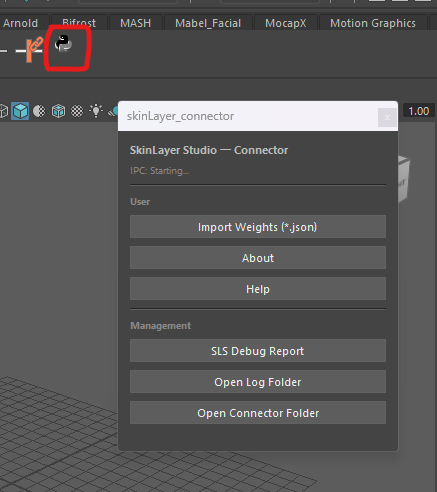
The red outline in the picture is only an example of a shelf button. It is not part of the product.
4. Keep it on a shelf
While auto-start is blocked, run the script once every time you open Maya.
In the Script Editor, select the whole script, then middle-mouse-drag it onto the Shelf.
The button type must be Python. A MEL button will not run it.
If it still fails
- You are on the Python tab and ran the whole script
- No partial text was selected when you ran it
- You clicked [Re] in SkinLayer Studio
Send a screenshot of the Script Editor output and we will check it.
This step connects. It does not install. It starts the connector that is already installed and opens its window.
To help us see the cause, run the script in FAQ.4 — send a check log and email the full output.