SkinLayerStudio
F02 — Menu Bar
Download Markdown Download with ImagesSkinLayer Studio 1.3.x Standalone UI reference.
Practice: EP00–EP12 · Features: F01–F17 (order 50+).Top menus: File · Tools · View · Edit · Options · Help.
Screen position: UI layout #2.
For detailed dialogs, follow each linked guide.
File
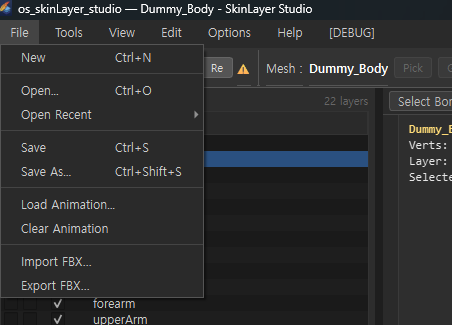
| Menu | Description |
|---|---|
New Ctrl+N |
New session |
Open... Ctrl+O |
Open .sls project |
| Open Recent ▸ | Recent files |
Save Ctrl+S |
Save |
Save As... Ctrl+Shift+S |
Save as |
| Load Animation... | Load from animation library → Timeline · Animation |
| Clear Animation | Clear animation cache |
| Import FBX... | Import FBX (can replace Pick) → FBX |
| Export FBX... | Export FBX → FBX |
Tools
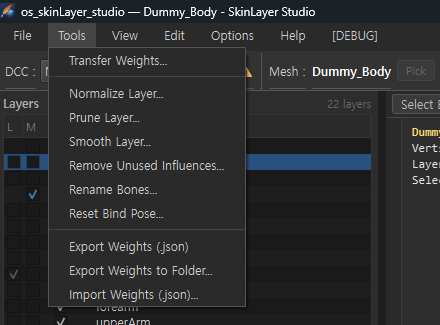
Entry points for weight cleanup, transfer, and JSON I/O.
| Menu | Description |
|---|---|
| Transfer Weights... | Transfer weights between meshes → Details |
| Normalize Layer... | Normalize layer |
| Prune Layer... | Remove weak weights |
| Smooth Layer... | Smooth layer (same as Tools tab) |
| Remove Unused Influences... | Remove unused bones |
| Rename Bones... | Batch rename bones |
| Reset Bind Pose... | Reset bind pose (careful) |
| Export Weights (.json) | Save active mesh JSON → JSON |
| Export Weights to Folder... | Batch JSON for multiple meshes |
| Import Weights (.json)... | Reload JSON / also compatible with Max connector |
Many tools are the same family as the Export tab and Tools tab in the right Options panel.
→ Tools panel
View
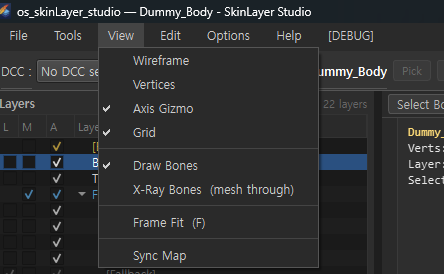
Viewport display toggles. Some items overlap with the viewport mode bar Display ▾.
| Menu | Description |
|---|---|
| Wireframe | Show wireframe |
| Vertices | Vertex points |
| Axis Gizmo | Axis gizmo |
| Grid | Ground grid |
| Draw Bones | Draw bones |
| X-Ray Bones (mesh through) | Show bones through the mesh |
| Frame Fit (F) | Frame the camera |
| Sync Map | Open Sync Map window → Skin Desk · Sync Map |
Edit
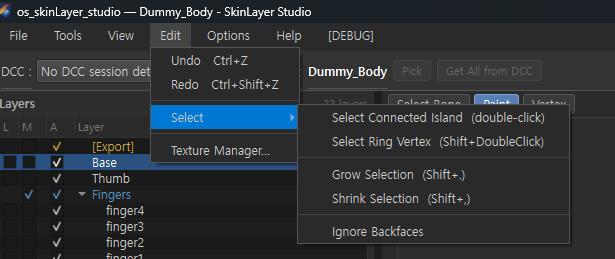
| Menu | Description |
|---|---|
Undo Ctrl+Z |
Undo |
Redo Ctrl+Shift+Z |
Redo |
| Select ▸ | Vertex selection helpers (below) |
| Texture Manager… | Manage texture paths → Details |
Select ▸
| Menu | Description |
|---|---|
| Select Connected Island (double-click) | Select connected vertex island |
| Select Ring Vertex (Shift+double-click) | Ring select |
Grow Selection Shift+. |
Grow selection |
Shrink Selection Shift+, |
Shrink selection |
| Ignore Backfaces | Ignore backface vertices (toggle) |
Useful in Vertex mode.
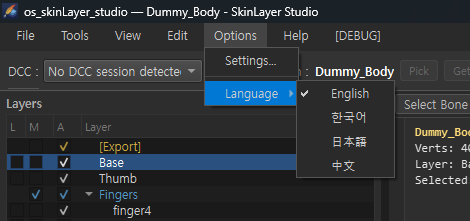
Options
| Menu | Description |
|---|---|
| Settings... | Global options dialog → Options guide |
| Language ▸ | English · 한국어 · 日本語 · 中文 |
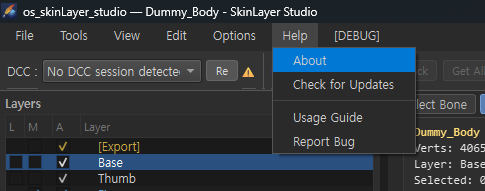
Help
| Menu | Description |
|---|---|
| About | Version · info |
| Check for Updates | Check for updates |
| Usage Guide | Open usage guide |
| Report Bug | Report a bug |
The [DEBUG] menu is for development and diagnostics. It is not covered in general viewer guides.
Menu ↔ detail docs
| Common menu | Details |
|---|---|
| Tools → Transfer Weights | Transfer Weights |
| Tools → Export/Import JSON | Export JSON |
| File → Import/Export FBX | FBX |
| File → Load Animation | Timeline · Animation |
| Edit → Texture Manager | Texture Manager |
| Options → Settings | Options |
| View / viewport display | Viewport menu bar |
Images: menubar_file.png · menubar_tools.png · menubar_view.png · menubar_edit.png · menubar_options_lang.png · menubar_help.png
Written: 2026-07-26