F14 — Timeline · Animation
Download Markdown Download with ImagesSkinLayer Studio 1.3.x Standalone UI reference.
Practice: EP00–EP12 · Features: F01–F17 (order 50+).Check poses with the bottom time slider, and
quickly save/load test animations with Save / Load Animation.
How to use it for skinning tests
After painting weights, you do not need to re-pose in DCC every time:
- Prepare a test anim once in DCC → cache with Pick-only Ani
or Load directly from Templates / My Animations - Scrub · play on the timeline to check deformation
- Save frequently used test anims with Save Animation into the internal library for reuse
| Store | Use |
|---|---|
| My Animations | Test anims you saved (user library) |
| Templates | Product-bundled templates (e.g. Body Pose Test) — load immediately for skinning checks |
Timeline bar (bottom of screen)

Layout zone #10. → UI layout
| UI | Description |
|---|---|
| ⬇ Pick-only Ani | Bake bone animation only from DCC into cache (does not touch mesh · weights · bind) |
| ▶ / ■ | Play / stop cached anim |
| Cache label | e.g. Set fit at 30fps / No Cache — bake · load status |
| Ruler · frame numbers | Scrub · current frame |
| S / E (or range) | Animation start · end frames |
| : menu | Set SLS to DCC · Load / Save / Clear Animation |
File menu also has Load Animation... / Clear Animation.
: menu
| Menu | Description |
|---|---|
| ↑ Set SLS to DCC | Match SLS current frame · range to DCC |
| Load Animation... | Open Animation Library |
| Save Animation... | Save current cache to My Animations |
| Clear Animation | Clear cache |
Save Animation — store a test anim internally
With a cache present, Save Animation...
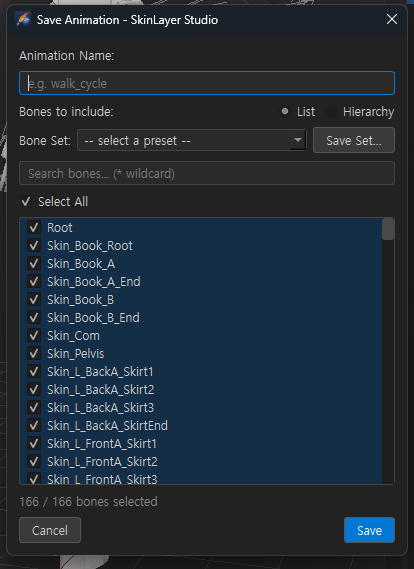
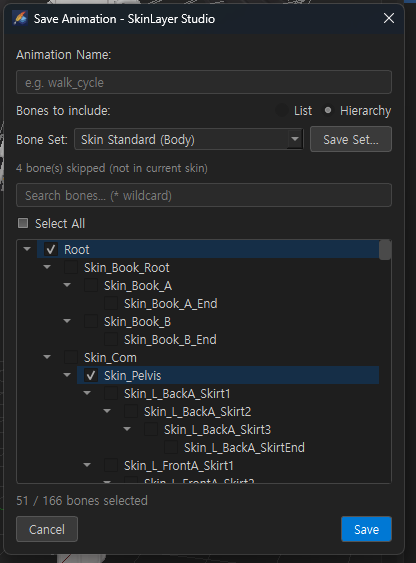
| UI | Description |
|---|---|
| Animation Name | Save name (e.g. walk_cycle, pose_test_arm) |
| List / Hierarchy | How the bone list is shown |
| Bone Set | Preset (e.g. Skin Standard (Body)) — save only selected regions |
| Save Set... | Save current selection as a bone set |
| Search | Bone name filter (* wildcard) |
| Select All / checks | Bones to include |
| Bottom | N / M bones selected · bones not in Skin are skipped |
Save → stored in the user anim library (My Animations).
Next time, Load alone reuses the same test motion.
Load Animation — templates / your anims
Load Animation... → Animation Library
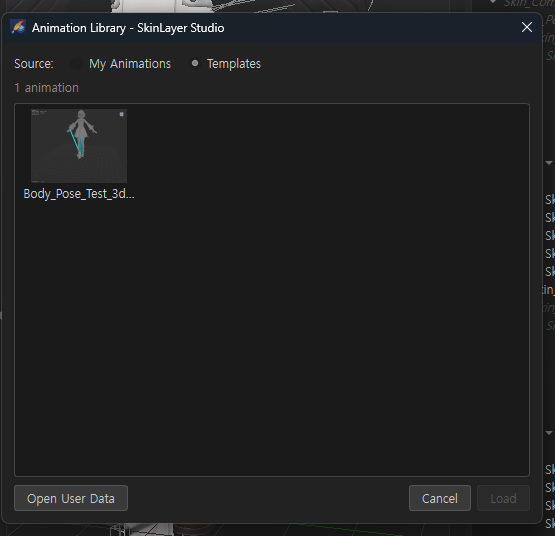
| UI | Description |
|---|---|
| My Animations | Test anims you Saved |
| Templates | Bundled templates (pose/clips for skinning checks) |
| Thumbnail list | Select then Load (double-click also works) |
| Open User Data | Open the user anim folder in Explorer |
Pick something like Body_Pose_Test… under Templates to
load a skinning-test motion immediately without making a custom anim.
If axis settings differ from the saved clip, you may see an Axis Mismatch warning — check before Load (distortion possible).
Recommended flow (fast skinning test)
A) Test immediately with a template
   Load Animation → Templates → pick item → Load
   → scrub timeline / ▶ play → check · fix weights

B) Reuse your own test anim
   DCC anim → Pick-only Ani (cache)
   → Save Animation (name · Bone Set)
   → later Load → My Animations again

C) Match frames with DCC
   : → Set SLS to DCC
Related docs
| Doc | Contents |
|---|---|
| UI layout guide | Timeline #10 |
| Hierarchy — Pick-only Bones | Refresh bone transforms only (different family from anim) |
| Tools panel — Scene | Viewport display |
Images: anim_timeline_menu.png · anim_save_dialog_list.png · anim_save_dialog_hierarchy.png · anim_library_templates.png
Written: 2026-07-26