SkinLayerStudio
F03 — Layers Panel
Download Markdown Download with ImagesSkinLayer Studio 1.3.x Standalone UI reference.
Practice: EP00–EP12 · Features: F01–F17 (order 50+).Describes the upper-left Layers window from screenshots.
For overall UI placement, see #4 in the UI layout guide.
Panel at a glance
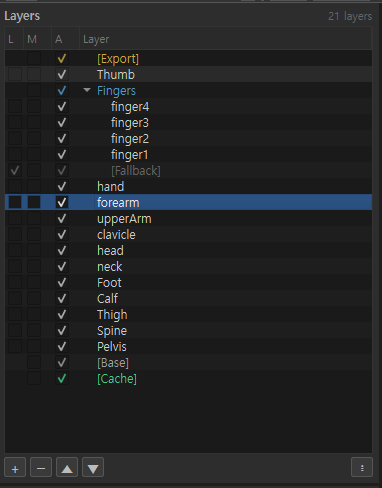
| Item | Content |
|---|---|
| Title | Layers |
| Count | Right side N layers (e.g. 21 layers) |
| Role | Stack weights as layers and manage edit order, visibility, and groups |
Columns (L / M / A / Layer)
Header: L · M · A · Layer
| Column | Meaning | Description |
|---|---|---|
| L | Cache Lock | When checked, cache-locks that layer (e.g. lock mark on [Fallback]) |
| M | Modified | Modified indicator |
| A | Active / Visible | Layer active · visibility. State shown by check/color |
| Layer | Name | Layer · group · separator · system layer name |
Tree arrows (▼) are drawn in the Layer column and collapse/expand groups.
Layer types · color cues
| Display | Meaning |
|---|---|
| Normal name (white) | Regular work layer (hand, forearm, Spine …) |
| Blue name + ▼ | Layer Group (e.g. Fingers → finger1…finger4) |
Yellow [Export] |
Export system layer |
Gray [Fallback] |
Fallback system layer (lock/move may be restricted) |
[Base] |
Base system layer |
Green [Cache] |
Cache system layer |
| Blue background row | Currently selected layer (e.g. forearm) |
[Export]/[Base]/[Cache]/[Fallback]are system layers; delete/move may be restricted compared with normal layers.
Bottom buttons (+ − ▲ ▼ · ⋮)
Toolbar under the panel:
| Button | Action |
|---|---|
| + | Add new layer |
| − | Delete selected layer |
| ▲ | Move up (Ctrl+Up) |
| ▼ | Move down (Ctrl+Down) |
| ⋮ | Separator options menu |
Separators — ⋮ menu
Use when you want to split the layer list into sections.
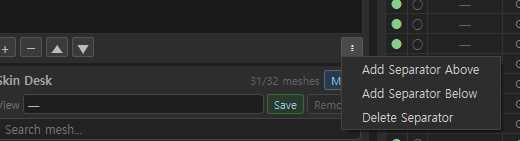
| Menu | Action |
|---|---|
| Add Separator Above | Separator above the selection |
| Add Separator Below | Separator below the selection |
| Delete Separator | Delete separator |
The ⋮ menu lives on the Layers toolbar; when open it may appear near Skin Desk.
Right-click context menu
Right-click a layer to open the edit menu.
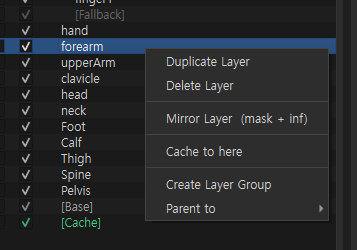
| Menu | Action |
|---|---|
| Duplicate Layer | Duplicate selected layer |
| Delete Layer | Delete selected layer |
| Mirror Layer (mask + inf) | Mirror mask + influences |
| Cache to here | Place cache at this layer position |
| Create Layer Group | Create a layer group |
| Parent to > | Parent under another group/layer (submenu) |
Recommended workflow
1) Click the layer to edit (blue highlight)
2) Edit weights in viewport Paint / Influences
3) Organize with Duplicate / Mirror / Group as needed
4) Adjust blend order with ▲▼ or drag
5) Add Separators with ⋮ for hand · arm · body sections
6) Push results with top Apply to Skin
Related docs
| Doc | Contents |
|---|---|
| UI layout guide | Full screen orientation · zones |
| Practice EP03 Overview | Layer system practice flow |
Images: layers_panel_overview.png · layers_separator_menu.png · layers_context_menu.png
Written: 2026-07-26