F13 — Import / Export FBX
Download Markdown Download with ImagesSkinLayer Studio 1.3.x Standalone UI reference.
Practice: EP00–EP12 · Features: F01–F17 (order 50+).What is FBX for?
Move mesh · skeleton (optional anim) as a package. Import when Pick fails.
Weights-only / same topology → JSON.SLS can Import and Export FBX.
When DCC Pick / Get All fails, you can temporarily Export FBX from DCC then Import here.
Menu locations
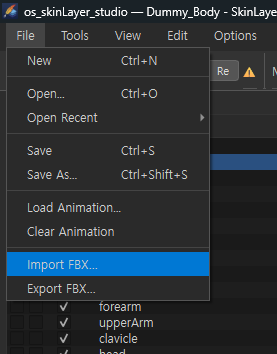
File  →  Import FBX…
File  →  Export FBX…
When Pick fails (temporary workaround)
The normal flow is DCC connect → top Pick / Get All.
If connect · Pick fails or is unstable:
1) In DCC (3ds Max, etc.), Export mesh(+skin) as FBX
2) SLS: File → Import FBX… to load
3) Once Skin Desk slots appear, paint · layer as usual
4) After work:
   - File → Export FBX… again
   - or Tools → Export Weights (.json) → Max connector Import
   - (if connected) Apply to Skin
Import creates a slot per skinned mesh in the file — multi-mesh load similar to Pick All.
Walkthrough: EP15 — FBX · JSON Workaround
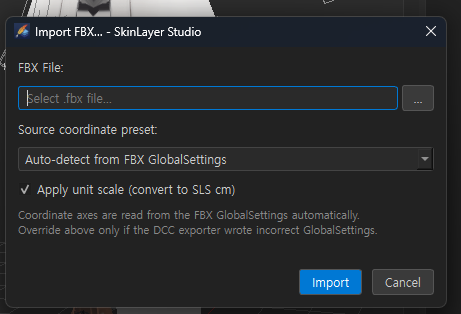
If axis · units look wrong, check coordinate preset / unit scale in the Import dialog.
Import FBX…
| UI | Description |
|---|---|
FBX File + … |
Choose .fbx |
| Source coordinate preset | Default: Auto-detect from FBX GlobalSettings — use axes written in FBX. Manual override only if DCC wrote GlobalSettings incorrectly |
| Apply unit scale (convert to SLS cm) | When ON, convert DCC units → SLS cm (recommended) |
| Import | Run import |
Imported meshes · skins become Skin Desk slots.
Export FBX…
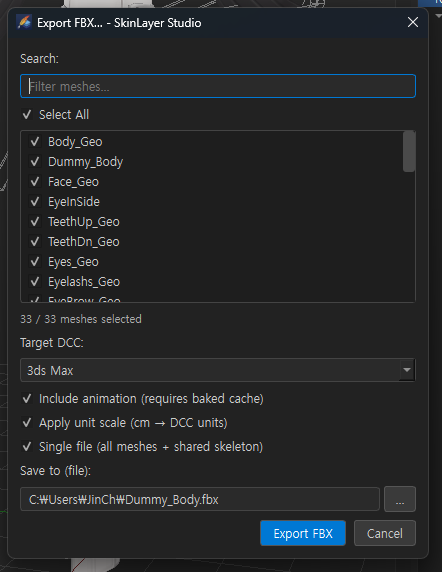
Exports meshes loaded in Skin Desk as FBX.
| UI | Description |
|---|---|
| Search / Select All | Filter · select all meshes to export |
| Mesh check list | e.g. Body_Geo, Dummy_Body, … (N / M meshes selected) |
| Target DCC | Target DCC preset (e.g. 3ds Max) — axis/unit matching |
| Include animation | Include baked anim cache when present (else static) |
| Apply unit scale (cm → DCC units) | SLS cm → target DCC units |
| Single file (all meshes + shared skeleton) | ON: selected meshes + shared skeleton as one file |
Save to (file) + … |
Save path |
| Export FBX | Export |
With Single file off, it runs in per-mesh file/folder mode.
Import vs Export at a glance
| Import FBX | Export FBX | |
|---|---|---|
| Direction | File → SLS | SLS → file |
| Use | Pick alternative load · offline import | Send mesh/skeleton to DCC · backup |
| Axis/units | Source preset + → SLS cm | Target DCC + cm → DCC |
For weights-only file exchange, JSON fits better.
→ Export / Import Weights (.json)
Related docs
| Doc | Contents |
|---|---|
| UI layout guide | Top Pick / Apply to Skin |
| Export / Import Weights (.json) | Weight JSON · Max connector |
| Practice EP02 Install | DCC connector |
Images: fbx_file_menu.png · fbx_import_dialog.png · fbx_export_dialog.png
Written: 2026-07-26