F11 — Transfer Weights (Tools Menu)
Download Markdown Download with ImagesSkinLayer Studio 1.3.x Standalone UI reference.
Practice: EP00–EP12 · Features: F01–F17 (order 50+).What is Transfer for?
Send weights from a dummy/other mesh once (choose Method).
Different from Sync Now (keep a Sync network in lockstep).
Example: calf Dummy done → Transfer (Closest Point + Add as new layers) → Body.Weight transfer between meshes, plus cleanup tools under the menu-bar Tools menu.
For the practical dummy → transfer flow, see Create Dummy · Transfer.
Open from the menu
Top menu bar:
Tools → Transfer Weights...
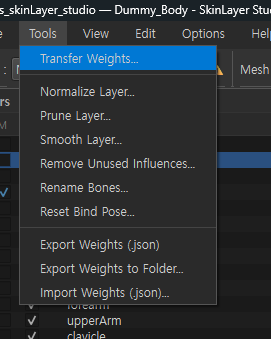
The same Tools menu also has Normalize / Prune / Smooth / Export·Import, etc. (see Tools menu items below).
Other entry points
| Path | Description |
|---|---|
| Tools → Transfer Weights... | Menu bar (image above) |
| Skin Desk / Sync Map right-click | Transfer Weights... |
| After dummy work | Run with Source=Dummy, Target=main mesh → Dummy guide |
Transfer Weights dialog
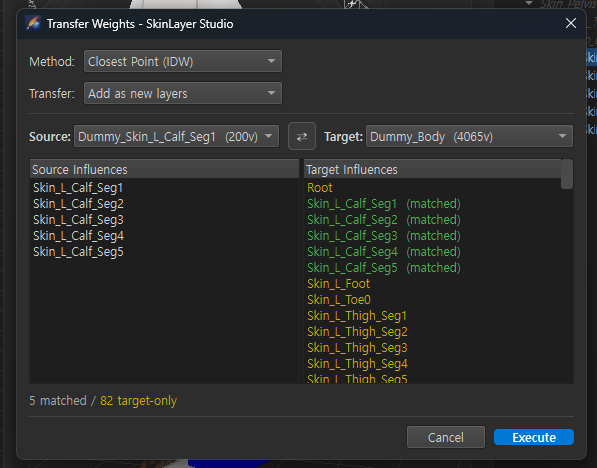
Copies/adds Source mesh layer weights onto the Target mesh.
Method
| Option | When |
|---|---|
| Closest Point (IDW) | Different topology (dummy→body, clothing, etc.). Inverse Distance Weighting from nearby vertices |
| Vertex ID (Same Topology) | Same vertex count · order. 1:1 by index |
If same topology is detected, Vertex ID may be selected by default. Dummy→body is usually Closest Point (IDW).
Transfer
| Option | Action |
|---|---|
| Overwrite | Overwrite Target’s existing weights/layers (careful) |
| Add as new layers | Add as new layers on Target (keep existing) — recommended for region dummy work |
Source / Target
| UI | Description |
|---|---|
| Source | Sending mesh (e.g. Dummy_Skin_L_Calf_Seg1) |
| Target | Receiving mesh (e.g. Dummy_Body, Body_Geo) |
| ⇄ | Swap Source ↔ Target |
Parentheses like (200v) are vertex counts.
Influences comparison
| Display | Meaning |
|---|---|
| Green (matched) | Same-name bones on Source · Target → used for transfer |
| Yellow (Target only) | Bones only on Target — no matching Source weights |
| Orange/Source only | Bones only on Source — may be lost if missing from Target Skin → reinforce with Add Inf from Source, etc. |
Bottom summary example: 5 matched / 82 target-only
Buttons
| Button | Action |
|---|---|
| Execute | Run transfer with current settings |
| Cancel | Cancel |
| Setup Target Skin | Shown when Target has no Skin — prompts Skin setup |
| Add Inf from Source | Add Source-only bones to Target (when shown) |
Layers after transfer
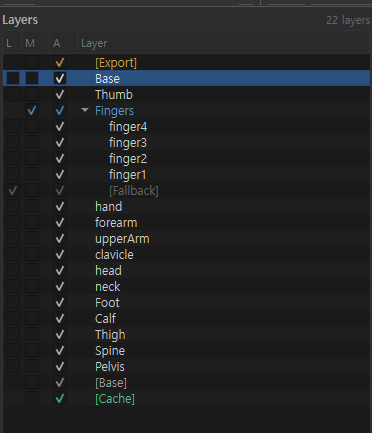
With Add as new layers, Target Layers gains Calf, Thigh, Base, etc.
Groups (finger1… under Fingers) are kept according to structure.
Recommended settings (dummy → body)
| Item | Value |
|---|---|
| Method | Closest Point (IDW) |
| Transfer | Add as new layers |
| Source | Dummy_… |
| Target | Dummy_Body or Body_Geo |
→ Execute → check new layers in Layers → refine with Paint if needed.
Tools menu items
| Menu | Description |
|---|---|
| Transfer Weights... | Transfer weights between meshes (dialog above) |
| Normalize Layer... | Normalize layer weights (sum 1.0, etc.) |
| Prune Layer... | Remove weak weights under threshold |
| Smooth Layer... | Smooth weights/mask for a layer |
| Remove Unused Influences... | Remove bones that are 0 on all vertices (Active / All Meshes) |
| Rename Bones... | Batch bone rename dialog |
| Reset Bind Pose... | Reset bind pose (Active Mesh / All Meshes) — hard to undo |
| Export Weights (.json) | Save active mesh weights as one JSON file |
| Export Weights to Folder... | Pick multiple meshes and save JSON to a folder |
| Import Weights (.json)... | Import JSON weights onto a loaded mesh |
JSON can also be loaded in the 3ds Max connector.
→ Export / Import Weights (.json)
Normalize / Prune / Remove Unused are the same family as the right Export tab buttons.
Smooth Layer is the same entry as Smooth Layer... on the Tools tab.
→ Tools panel details
Difference from Sync Now (short)
| Transfer Weights | Sync Now | |
|---|---|---|
| Use | One-shot transfer Source→Target (choose method · layer mode) | Sync the mesh network linked by Sync relations |
| Entry | Tools menu / right-click | Skin Desk · Sync Map |
| Region dummy work | Paint dummy → Transfer is typical | Full-body Dummy as SRC, Sync onto parts |
Related docs
| Doc | Contents |
|---|---|
| Create Dummy · Transfer | Create dummy → Transfer practice |
| Skin Desk · Sync Map | Sync / Map right-click |
| Tools panel details | Export tab · Smooth Layer |
| Layers panel details | Layers after transfer |
| Export / Import Weights (.json) | JSON save · Max connector · SLS reload |
| Practice EP05 Merge & Transfer | Full-body practice |
Images: tools_menu_bar.png · dummy_transfer_weights.png · transfer_layers_result.png
Written: 2026-07-26